
Central IT Services provides the UNIL community with an institutional version of Microsoft 365 Copilot Chat “Protected”, activated under the CASA-EES contract. It is currently the only generative language model made available to the entire UNIL community because the negotiated contractual terms meet legal compliance requirements and UNIL security standards. Other solutions could be considered in the future, provided they meet similar conditions and appear on the list established by the DPO.
What You Can Do with Microsoft 365 Copilot Chat
Microsoft 365 Copilot Chat, like other Microsoft 365 tools deployed at UNIL (OneDrive, Teams, Outlook), has been validated for temporary use as part of the collaborative tools made available. It can therefore be used to process private documents or content subject to official secrecy, under the same contractual security conditions.
⚠️ Warning: the Copilot Chat interface does not have a button to enable or disable web search. Depending on the wording of your request (e.g., “find me the latest work by…” or “what is the news on…”), Copilot may automatically trigger a search via Bing, resulting in data transmission outside the protected environment. Avoid any request likely to trigger an online search when working with private documents or those subject to official secrecy (see the “Use the UNIL agent 📘 [Secure]” section below).
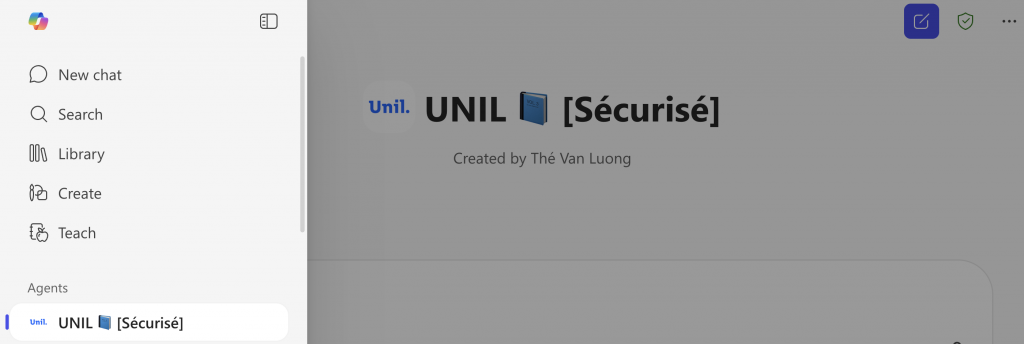
Use the UNIL 📘 [Sécurisé] agent
To avoid any risk of accidental external search, a dedicated UNIL 📘 [Secure] agent is available in Copilot Chat. This agent has been configured so that web search (Bing) is disabled by default, ensuring that your data remains within the protected Microsoft 365 environment. It is recommended to prioritize this agent for processing private documents or content subject to official secrecy.
Sensitive Data: Do Not Enter
Certaines données sensibles au sens de la législation suisse, comme des dossiers médicaux, des informations de santé identifiantes ou des données RH confidentielles, ne doivent pas être saisies dans Microsoft Copilot. Leur traitement requiert des systèmes spécifiquement approuvés par l’UNIL comme des modèles locaux déployés sur les infrastructures du Centre informatique ou sur des ordinateurs personnels (voir tutoriel), sans recours à des services cloud.
In practice
- Data is processed in Microsoft data centers located in Switzerland, with the possibility of processing in the European Union. Contractual guarantees meet all requirements of Swiss data protection law.
- The models used belong to the same family as OpenAI’s, but they are deployed via Microsoft Azure and were not trained on the same data as ChatGPT.
- Permitted uses in teaching and research are defined by the guidelines of your faculty or school. Please ensure strict compliance with these directives.
How to access it?
- Go to copilot.cloud.microsoft.com.
- Log in with your UNIL credentials.
- Check for the ‘Protected’ shield next to your profile: it guarantees that your queries are neither stored nor used for training AI models.