
Why use local AI?
With LM Studio and a model downloaded to your computer, you can summarise, translate, rephrase a document or ask questions about its contents, offline. The application and these open-weight models are free, with no account required. Internet access is needed for installation, downloads and updates.
At UNIL, sensitive data as defined under Swiss legislation, in particular the Vaud data protection act (LPrD) (health, opinions, etc.), must be processed with a local solution that is authorised and appropriate for that data. The AI_GO questionnaire helps you choose an authorised tool, alongside the UNIL AI FAQ (in French); you must also follow the rules of your course, faculty or publisher. For information covered by official secrecy that does not include sensitive data, UNIL’s institutional Copilot with your UNIL account and the UNIL [Sécurisé] agent may be suitable, except for HR data or delicate personal data. For sensitive research data, first contact the DCSR, the research computing support unit, via helpdesk@unil.ch.
Let us be honest. These small models can make mistakes and remain less capable than the best online models. Their main benefit is confidentiality, with no guarantee of energy savings.
Install LM Studio
Ideally, plan for 16 GB of RAM, about 6 to 8 GB of disk space per compressed model, plus the application. On Mac: an Apple Silicon chip (M1 or newer) and at least macOS 14; Intel Macs are not supported. On Windows: an AVX2-compatible Intel/AMD processor or Snapdragon X Elite (official requirements). A dedicated graphics card can speed up responses, but is not essential.
- On lmstudio.ai/download, scroll down to the LM Studio section, below Bionic, and choose “Download LM Studio”.
- Install then open the application. Labels vary depending on the language and version: look for the function described.
Which model should you choose?
When in doubt, start with Qwen3.5 9B, the choice we made in our tests. On a modest computer, a long document can take more than ten minutes: this wait does not necessarily mean something has gone wrong.
| Model | When should you choose it? |
|---|---|
| Qwen3.5 9B | A good balance between quality and memory use to get started with documents; responses can be slow. |
| Gemma 4 E4B | To prioritise speed, with more limited capabilities and no guaranteed memory savings. |
| Gemma 4 12B | To prioritise overall quality: the highest score of the three in the Artificial Analysis index checked on 8 October 2026 (estimate). More memory-intensive, especially for long documents. |
File size is not the whole picture: the document and conversation also use memory. Check the memory estimate when loading and any warnings from LM Studio. You can keep several models installed if disk space allows. Our tests were run on a MacBook Air M1 with 16 GB of RAM, using LM Studio 0.4.16.
Download the model
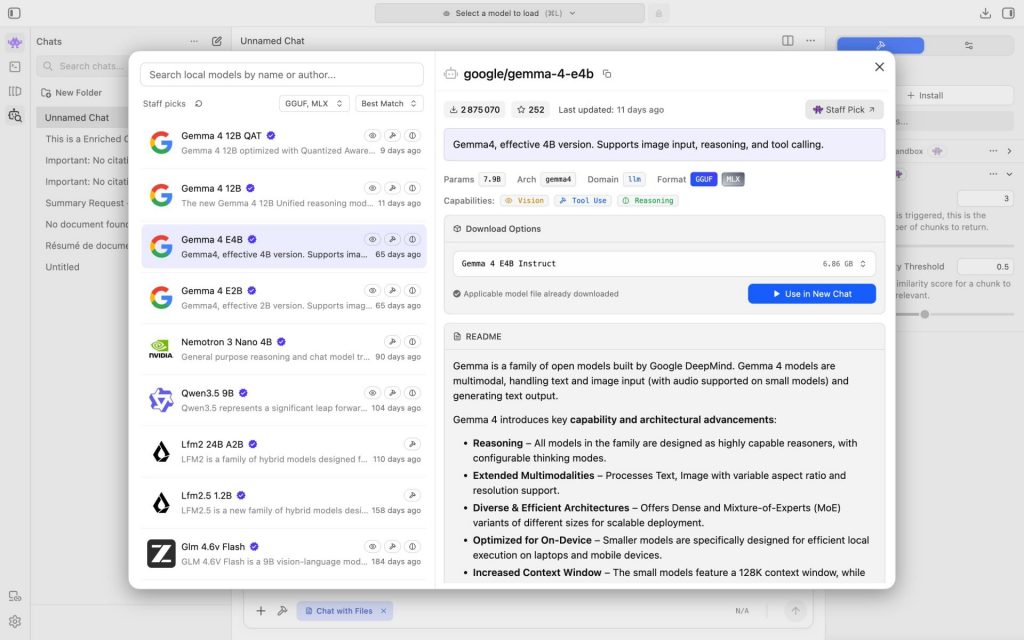
- Open the “Discover” magnifying glass and search for the full name of your chosen model, for example qwen3.5 9b. Select the result with exactly that name.
- Download the default version if it is shown as compatible with your computer. For Qwen, if you need to choose: MLX 4bit on Apple Silicon Macs or GGUF Q4_K_M on Windows. For another model, choose a compatible 4-bit version. These compressed versions take up less space, sometimes at the cost of quality.
- After downloading, click “Use in New Chat” to load the model and open a conversation.
Set the context for a document
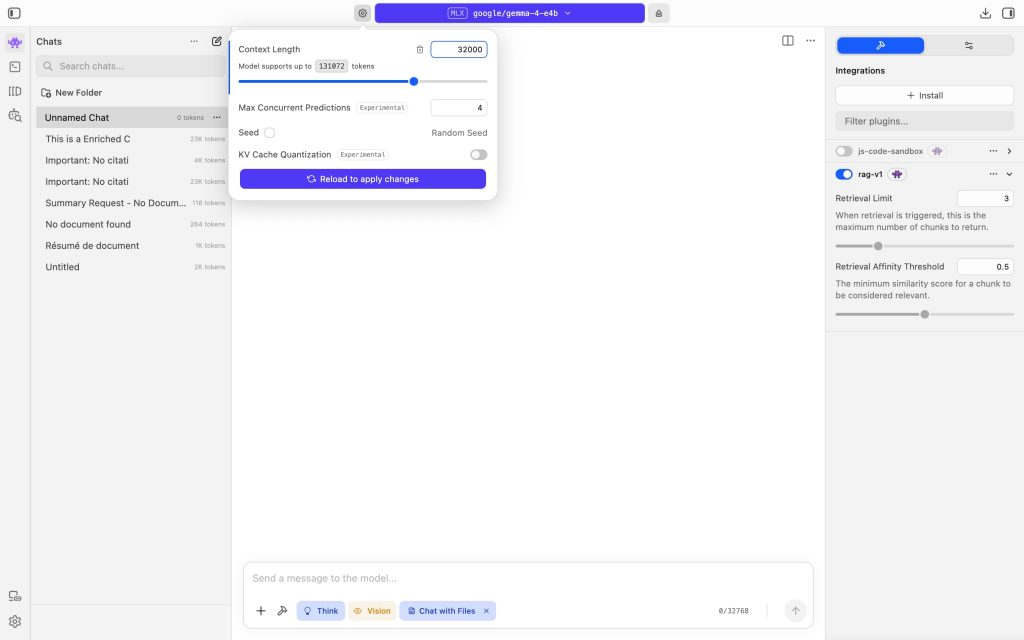
The context is the amount of text the model can keep in view, including the document and conversation. It is measured in tokens, pieces of words. If the document is too long, LM Studio only passes on excerpts, so a summary may omit sections.
- Click the cog to the left of the model name at the top. If needed, enable Settings → Developer to show the advanced settings.
- Try 32,000 in “Context Length”, if memory allows, then “Reload to apply changes”. With Gemma 4 12B on 16 GB, start closer to 16,000.
- If memory is insufficient, close demanding applications or lower this value and work in sections.
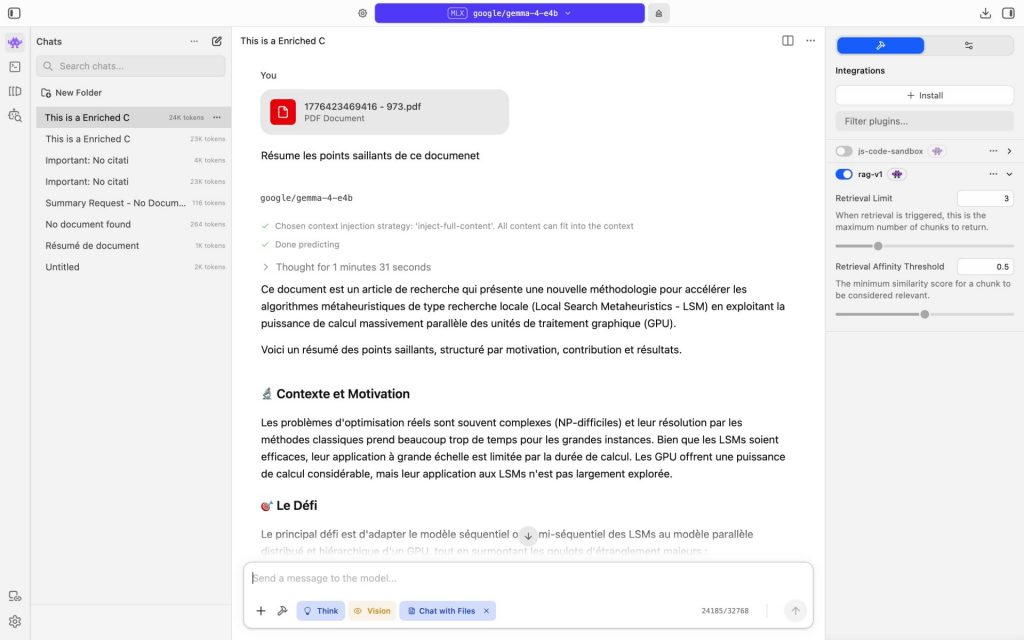
If the model says “I cannot see any document”, check that the file has loaded and try a larger context if memory allows. After this change, open a new conversation, attach the document and send the request again. 32,000 does not guarantee a complete summary. For each request, check the processing details: “inject-full-content” means all extracted text is sent; “retrieval” means only a few excerpts are sent. For an overall summary, if “retrieval” appears, if these details are not visible or if sections are missing, copy and paste the text in sections, each in a new conversation. Ask “Summarise this section”, then combine the summaries and check that all sections are covered.
Work on your document
For sensitive data, use an up-to-date computer with both the disk and backups encrypted, and lock your session when you are away. Choose a storage location authorised for this data, outside OneDrive, iCloud or an unauthorised cloud: Desktop and Documents are often synced. Use the downloaded local model, without web features or remote services; you can disconnect from the Internet after the downloads.
PDFs: watch out for ignored content. In this workflow, only extracted text is passed on, not images or charts. Scanned pages without selectable text may be ignored, leading to an incomplete or incorrect response. Prefer the original text file; do not send a sensitive document to an online converter.
Before sending, with Qwen and a long document, try turning off “Think”, below the message box. This may speed up the response, at the cost of less thorough reasoning. If reasoning continues or the wait becomes too long, work in sections.
- Open a new conversation for each document and drag the .pdf, .docx or .txt file into it. Wait until it has finished loading.
- For example, type: “Summarise this report in 5 points.”
- Check the response against the original document: figures, names and sections covered. Mention the use of AI if its contribution is significant.
After use. Delete conversations you no longer need. Copies or excerpts may remain in LM Studio: ask Central IT Services (helpdesk@unil.ch) for help removing them. The summary retains the sensitivity of the source document: protect it in the same way.
Alternatives
Ollama also lets you use local models. For an institutional solution, or if your computer is not powerful enough, contact Central IT Services (helpdesk@unil.ch).