
Summarizing a report, rewriting an email, coding an interview grid, preparing a quiz: generative AI is now everywhere. The real question is no longer “which tool is best?” but “am I allowed to put this particular data into that particular tool?”
AI_GO answers that question in two minutes. It is an online questionnaire, with no sign-up and nothing to install, developed by the AI Strategic Unit of UNIL. It examines the nature of your data and tells you which family of AI tools you may use. It is meant for the whole UNIL community, from students to teaching staff, researchers and administrative and technical staff.
One clarification up front: AI_GO answers the question of data. It does not tell you whether you are allowed to use AI for a graded assignment, an exam or a publication. That depends on the rules of your faculty, on the instructions of your teacher and on the terms of your publisher.
Available in French and in English, on computer and on mobile. No account, no data sent. Your answers stay in your browser.
Why this matters
Dropping a file into a consumer AI tool, or simply pasting an extract of text into it, means handing that data to a third-party company, often outside Switzerland, under terms of use that sometimes allow the content to be reused. Depending on the data involved, this can amount to a data leak, a legal breach or a breach of contract, without the slightest bad intent on your part. An attachment, a copy-paste and a sentence typed by hand all count exactly the same.
The difficulty is that the boundary is not intuitive. A list of course participants, interview notes that only look anonymized, a salary table, an extract from a student file: these cases fall under different regimes. AI_GO turns that legal reasoning into a short series of plain questions.
The three families of AI tools at UNIL
Every verdict the tool returns is expressed in terms of these three families, so they are worth knowing beforehand.
| Family | What it means | Where your data goes |
|---|---|---|
| Commercial LLMs | ChatGPT, Gemini, Claude, Mistral, etc., freely available or on a personal subscription. | To a private provider, with no institutional UNIL contract. |
| Institutional LLMs | Microsoft 365 Copilot Chat, contracted by UNIL. The safeguards only apply once you are signed in with your UNIL credentials on copilot.cloud.microsoft, not on the public version of Copilot. A dedicated UNIL [Secured] agent turns off web search by default, which prevents a query from triggering a Bing search and pushing your data outside the protected environment. | Into the Microsoft environment covered by the UNIL contract. Queries are neither retained nor used for training. |
| Local LLMs | A model running on your own machine, offline, or on infrastructure provided by UNIL. | On your machine, nothing leaves the computer. On UNIL infrastructure, the data stays within the institution. |
To go further: Microsoft Copilot at UNIL and installing a local AI model.
How it works
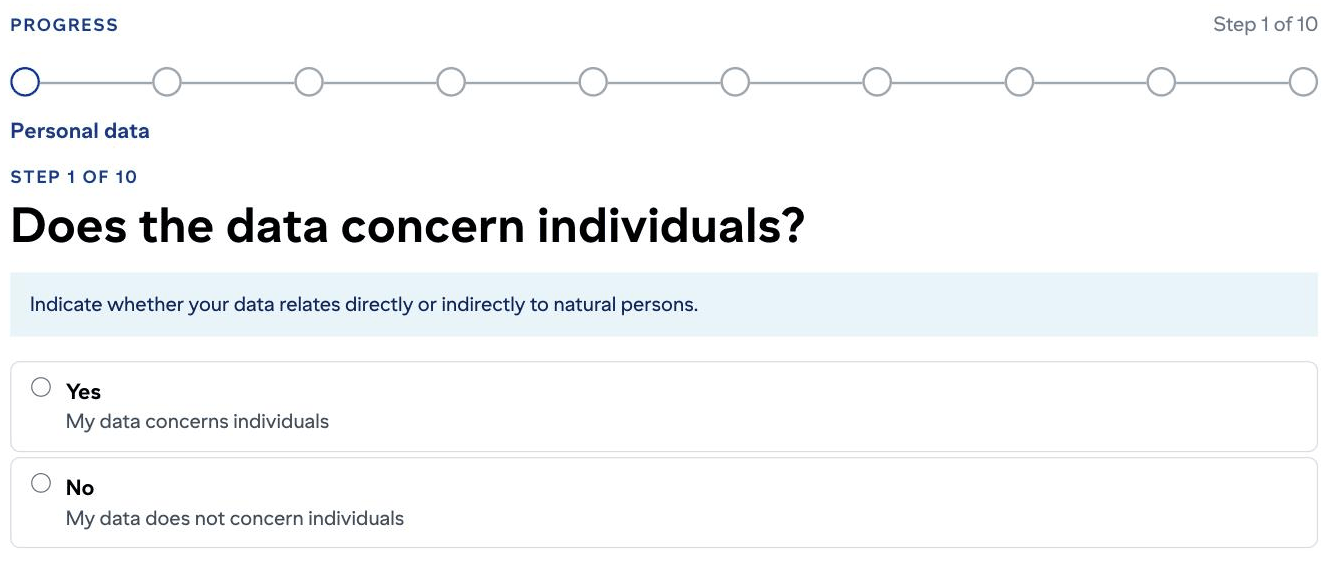
The questionnaire has ten steps, but you will only see some of them. Each answer removes the questions that have become irrelevant. For your own lecture notes, which are about nobody, two clicks are enough. The steps that were skipped appear crossed out in the list on the right of the screen.
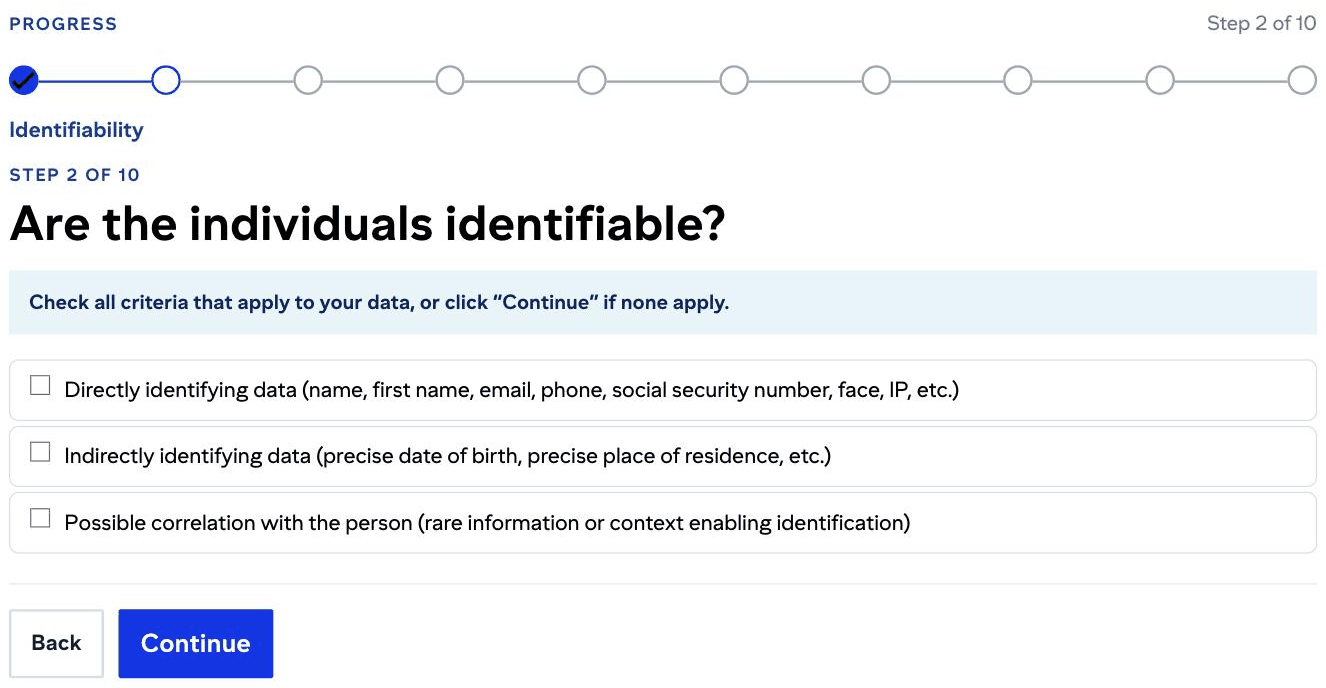
Two kinds of question alternate. Yes and No questions move on with a single click, with no button to confirm. Checkbox questions are confirmed with the Continue button. If none of the boxes matches your situation, click Continue without ticking anything. That is how you answer no.
Five situations, five paths
Here are five paths actually taken in the tool. Find the one closest to your own situation.
1. Revising from your own lecture notes
Step 1 → No (my data does not concern individuals) | Step 10 → No (the data can be shared freely)
Result: Unrestricted use. Two clicks, eight steps skipped.
The shortest path. It covers many everyday situations: personal notes, drafts, and material that is about nobody and that nothing prevents you from sharing. A published scientific article, on the other hand, remains subject to its publisher’s terms, which the questionnaire does not examine.
2. Working on interviews for a thesis
Step 1 → Yes | Step 2 → tick Directly identifying data, Continue | Step 3 → No
Step 5 → tick nothing, Continue | Step 7 → tick nothing, Continue | Step 9 → No (data you collected yourself, for this piece of work)
Result: Institutional LLMs or local LLMs.
An interview transcript stays personal data even without a surname. A first name, an age, an employer and a job title are enough to recognize someone. So that corpus goes into institutional Copilot, not into ChatGPT.
On an existing corpus that you have anonymized irreversibly, answer Yes at steps 9 and 9a and the verdict becomes “unrestricted use”. Be careful: this branch never asks whether a sharing restriction applies. An agreement, an ethics protocol or a promise made to the people you interviewed still bind you, and checking that is up to you.
3. Sorting a list of named students or participants
Same path as case 2.
Result: Institutional LLMs or local LLMs. External commercial LLMs are not allowed.
In plain terms: that list goes into institutional Copilot, not into ChatGPT. This is the most frequent case for administrative staff and for teaching staff alike. Same verdict for a batch of exam papers to mark or student work to comment on, since those are the output of identifiable students.
4. Analyzing a table of salaries
As in case 2 up to step 5, then:
Step 7 → tick Data on income or wealth, Continue | Step 8 → No (no impact assessment carried out)
Result: Local LLMs ONLY.
Everything turns on step 8. Without an impact assessment carried out with the Data Protection Officer, the risk is presumed to be significant. With an assessment concluding that the risk is low, the tool opens institutional LLMs back up.
5. Coding interviews that deal with health
As in case 2 up to step 3, then:
Step 5 → tick the category covering health, Continue | Step 6 → Yes
Result: Local LLMs ONLY, no institutional cloud LLM, no commercial LLM. The tool asks you to contact the DCSR.
This is the strictest outcome. Step 6 relies on the definition set out in the Swiss Human Research Act (art. 3 HRA), which covers any information relating to the health or illness of an identified or identifiable person.
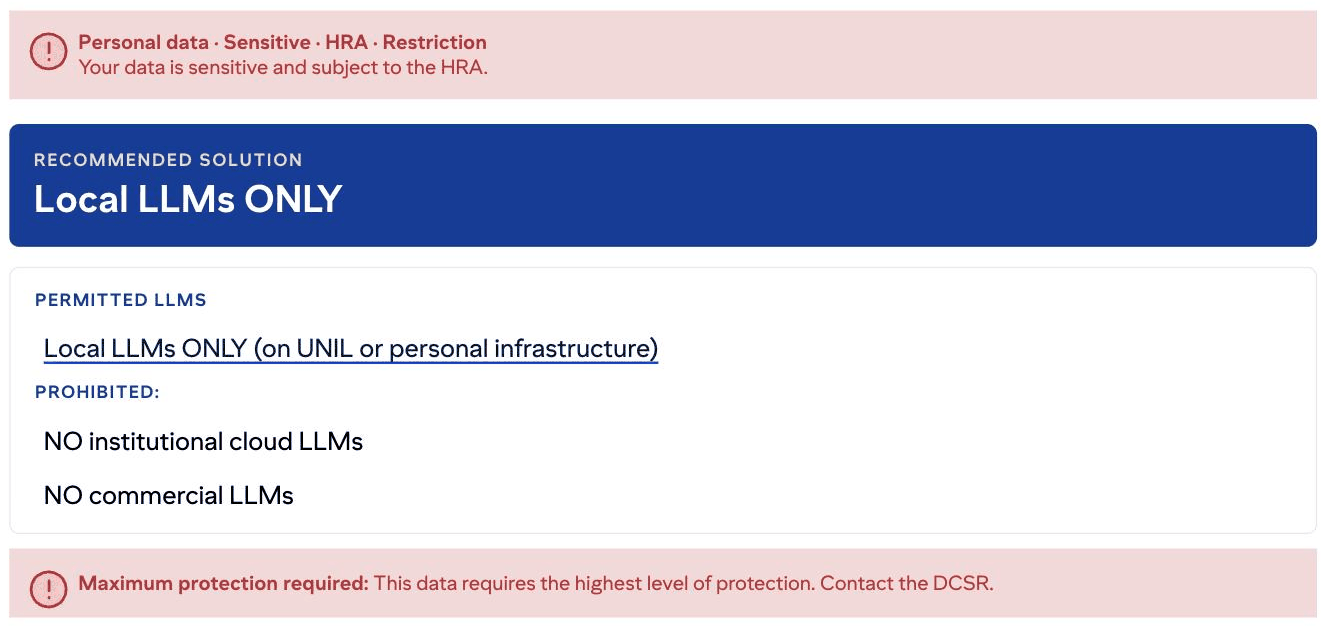
If that verdict lands on your data, the article installing a local AI model explains how to proceed.
Good to know
This is not legal advice. The tool says so itself. It does not guarantee full legal compliance, and the user remains responsible for the final assessment. Its verdict is about the nature of your data, not about the copyright of the documents you upload. Nor does it replace the rules of your faculty or the commitments made in a protocol or a contract.
The verdict only names language models. But it assesses your data, not the tools, and the same rule holds for any online AI service. If commercial LLMs are ruled out, so are online transcription, translation and meeting summaries.
Need help?
The tool points to three contacts: the Data Protection Officer (DPO) for personal data and impact assessments, the Scientific Computing and Research Support unit (DCSR) for technical questions about LLMs and infrastructure, and the Data Stewards for research data management.
Before entrusting a document, a pasted extract or even a single sentence to a generative AI, ask yourself one question: is this data about somebody, or am I bound by a particular duty of confidentiality? If the answer is yes, or if you are unsure, two minutes on AI_GO will settle it.
AI_GO was developed by the AI Strategic Unit of UNIL in collaboration with the law students of Professor Aurelia Tamò-Larrieux: Selma Lamas Valverde, Emma Lo Cicero and Clara Montangero. The tool is released under a CC BY-NC-SA 4.0 licence.