
Why switch to local AI?
By decision of the Rectorate, sensitive data as defined by Swiss law must not be processed in cloud solutions. The use of a local model is the recommended alternative.
Commercial LLMs (ChatGPT, Claude, Google, Gemini, etc.) send queries and files to external data centres. With LM Studio + Gemma 3n E4B, everything happens on your computer:
- 100% Open Source: All code, model weights, and tools are freely available, editable, and open to audit—offering total transparency and empowering users to retain full control of their data.
- No data is transmitted to remote servers: your information stays with you (the model works entirely offline).
- Indispensable for sensitive data as defined by Swiss law (health data, political or religious opinions, data relating to criminal proceedings, etc.). Also suitable for private documents or those subject to official secrecy, complementing institutional Microsoft Copilot Chat.
- Performance now credible against commercial solutions: Gemma 3n E4B reaches a score of nearly 1300 on Arena, while the latest cloud models are at ~1500.
- Controlled energy consumption: On a MacBook Air M2 (~20 W), the inference process (prompt + response) uses significantly less energy than a server equipped with an Nvidia H100 GPU (~700 W), which is commonly used for commercial models.
Install LM Studio
- Download the free app at https://lmstudio.ai.
- Run the installer, then open LM Studio. No account is required.
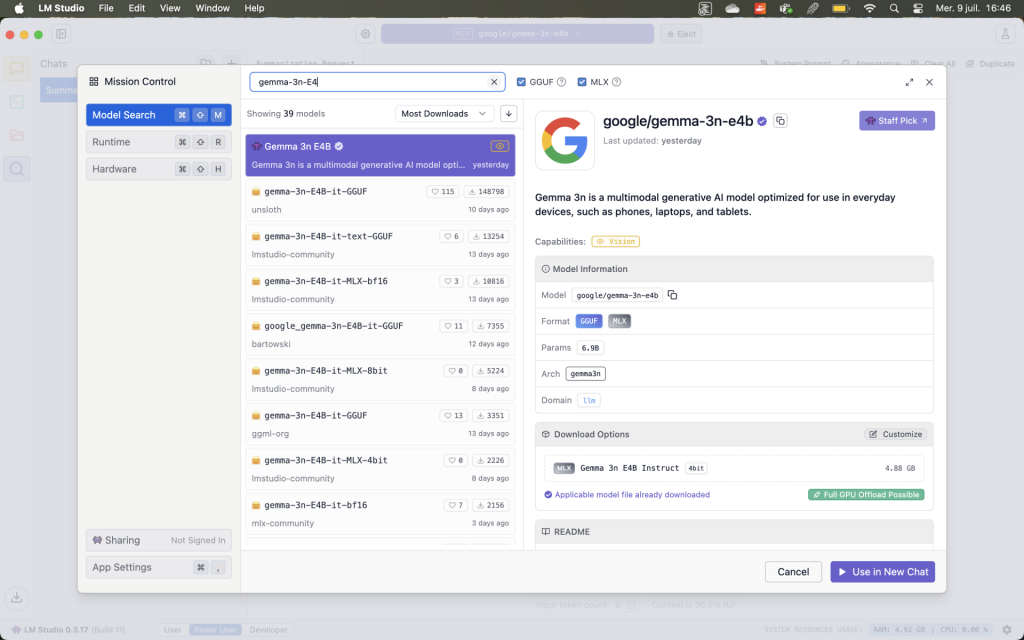
Add the gemma-3n-E4B model
- In the LM Studio search bar (Discover), type gemma-3n-E4B.
- Select the GGUF version (around 4 GB) rather than the MLX version (around 11 GB, too heavy for 16 GB of RAM).
- Click Download to copy the template (a few GB) to your computer.
- Once the download is complete, click Load to load it.
Work in complete confidentiality
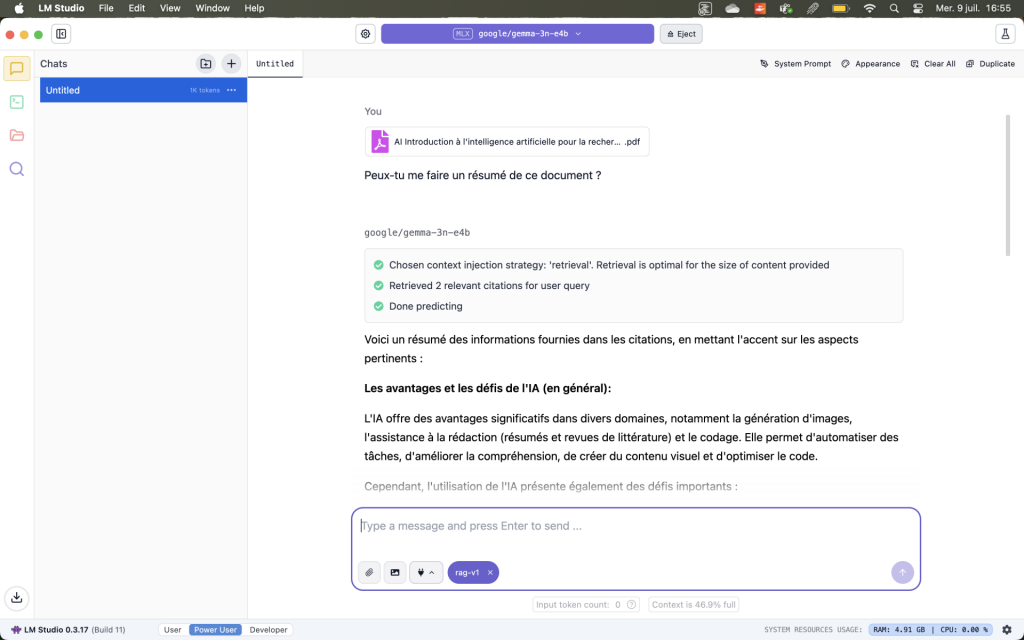
Drag and drop your PDFs, DOCXs, or internal reports into the chat window (wait for the document to load). LM Studio indexes and queries your documents without them leaving your computer. For sensitive data, this is currently the only approach compliant with UNIL requirements, as no data leaves your workstation.
Why choose the local Gemma 3n E4B model?
- Third generation “nano” (3n): designed to run on consumer PCs without specialised hardware.
- E4B: Effective 4 Billion — approximately 4 billion parameters, a small model designed for smartphones and PCs.
- GGUF format: single, ready-to-use file, already quantised, recognised by all major front-ends (LM Studio, Ollama, GPT4All, etc.).
- Optimal weight/performance balance: about 4 billion parameters (E4B) are sufficient to achieve a score of around 1300 on Arena (https://arena.ai/leaderboard) – versus ~1500 for the very latest cloud models.
- Apple Silicon–optimized: runs efficiently on M1 to M5 chips.
- Official details: https://deepmind.google/models/gemma/gemma-3n/
Possible alternatives
Among the possible alternatives are Ollama and GPT4All. For those new to running local AI, LM Studio remains the most accessible option. Other open-source models can also be found on Hugging Face. On machines with 32 GB of RAM or more, gpt-oss-20b (OpenAI) is a viable option. With 16 GB, gemma-3n-E4B remains the best choice: even gemma-3-12b-it (the closest competitor, with an Arena score of ~1330) cannot be loaded under normal usage conditions.
The Central IT Services can also make local models available on its own infrastructure, offering an alternative to installations on personal workstations.