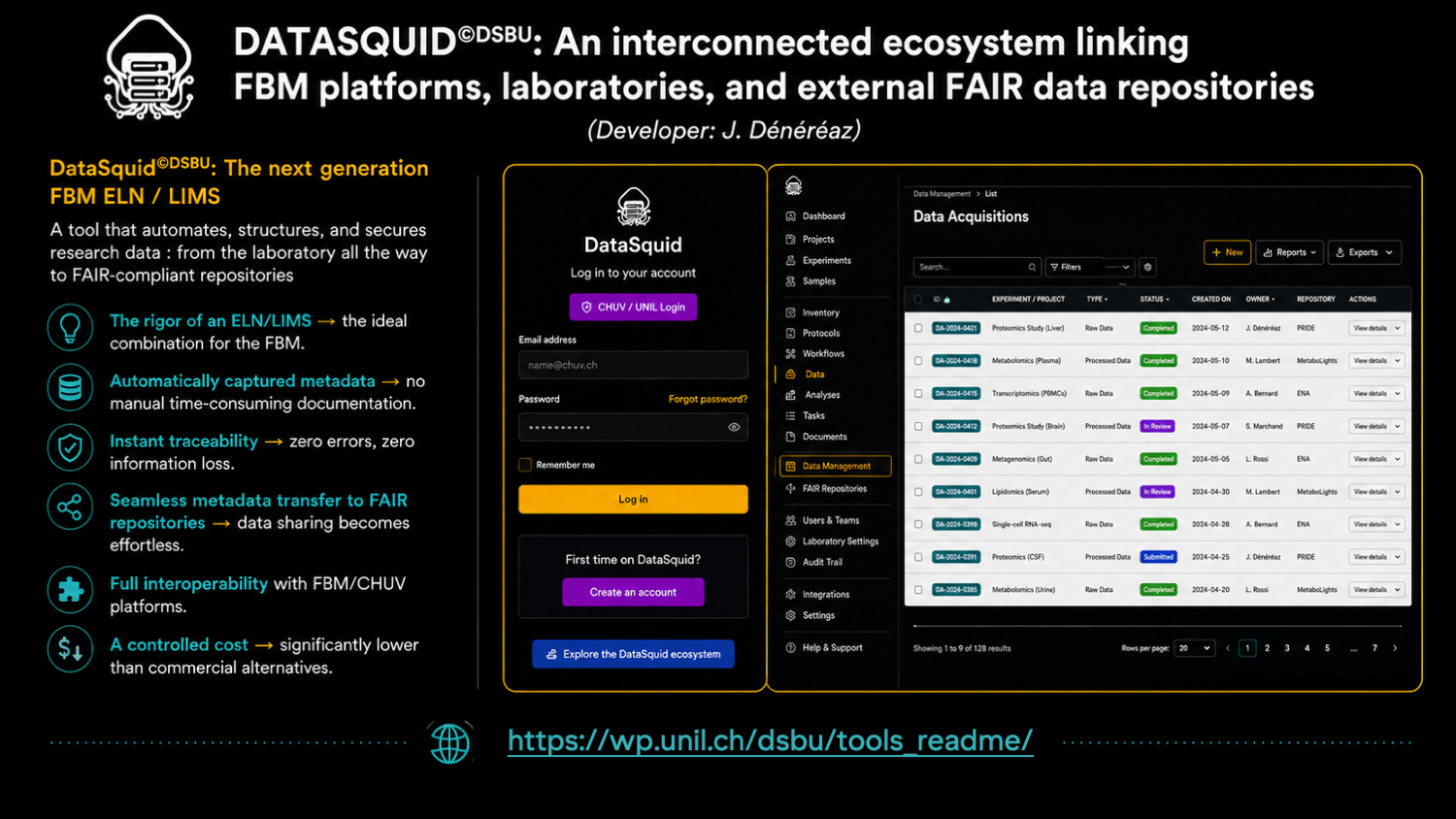
DataSquid©DSBU is an integrated Electronic Lab Notebook (ELN) and Laboratory Information Management System (LIMS) developed by the Data Stewardship Biomed Unit. It supports researchers throughout the entire research data lifecycle from biological materials and experimental procedures to data acquisition, analysis, storage, long-term preservation, and FAIR data sharing.
DataSquid©DSBU is the ELN/LIMS system supported by the FBM UNIL–CHUV Dean’s Office for biological and preclinical life-science data, and as a complementary documentation solution for clinical data, supporting FAIR data sharing and appropriate long-term preservation.
DataSquid©DSBU is sustainably supported by the FBM Dean’s Office, and the DSBU’s configuration, training, and user-support services for research data documentation are provided free of charge to researchers.
At the centre of DataSquid is a fully integrated Lab Notebook connected to all the platform’s functionalities. Researchers can document their daily activities and link each entry to the relevant biosamples, de-identified human-sample metadata, specimens, experimental protocols, equipment, data acquisitions, analyses, files, and NAS projects.
DataSquid connects with FBM technological platforms, institutional infrastructure, and external FAIR data repositories. Information is exchanged automatically through Application Programming Interfaces (APIs), reducing repetitive manual entry and allowing structured metadata to be imported, enriched, reused, and transmitted throughout the research workflow.
A growing proportion of data-intensive acquisition workflows across the 12 main FBM technological platforms is automated through connections with their equipment-booking and laboratory information systems. Depending on the platform, DataSquid can automatically retrieve acquisition information such as the researcher, Principal Investigator, instrument, booking or acquisition date, software and version, file format, data category, protocols, and technical parameters. Researchers then complete the acquisition by linking the relevant biosamples, specimens, NAS project, Lab Notebook entries, and acquired files.
DataSquid also includes Polaris, an integrated module for managing the physical storage of biological materials in life-science laboratories at UNIL and CHUV. Biosamples, specimens and reagents documented in DataSquid can be assigned directly to storage locations, freezers, racks, boxes, and individual positions, preserving the connection between their scientific description, experimental use, resulting data, and physical location.
Through its integration with BioMetaXtract©DSBU run by the DSBU, DataSquid can enrich acquisition records with technical internal metadata extracted directly from scientific data files. Instrument information, acquisition parameters, file formats, and standardized modality-specific metadata are combined with the scientific context already documented in DataSquid, including the samples, specimens, protocols, equipment, researcher, project, and associated files.
By combining daily laboratory documentation, structured sample and specimen metadata, automated data-intensive acquisition workflows, physical storage management, file-level metadata extraction, API-based integrations, and documentation generation, DataSquid improves the efficiency, consistency, traceability, transparency, and reproducibility of research.
To ensure appropriate implementation and optimal use of DataSquid, Principal Investigators must first contact the DSBU. Our team configures the platform according to the laboratory’s needs and provides personalized training sessions for laboratory members.
Link to DataSquid: https://dsbu.unil.ch/datasquid
Key Benefits
DataSquid enables laboratories to:
- Document research continuously within an integrated Electronic Lab Notebook.
- Connect samples, specimens, protocols, acquisitions, analyses, and files.
- Automatically retrieve acquisition information from FBM technological platforms.
- Record the names, storage paths, and URLs of acquired files.
- Enrich acquisition records with metadata extracted by BioMetaXtract.
- Generate README files and complete standardized dataset documentation.
- Prepare structured metadata for Long-Term Storage and FAIR repositories.
- Manage physical sample storage through the integrated Polaris module.
- Reduce duplicate data entry across research systems.
- Improve experimental traceability and preserve laboratory knowledge.
A Dedicated Workspace for Each Laboratory
Each research group has its own secure and individualized DataSquid workspace. The environment is prepared and configured by the PI with the help of the DSBU according to the laboratory’s scientific activities, organizational structure, equipment, data types, and documentation requirements.
Laboratory Settings
An integrated Lab Settings interface allows the PI and authorized lab users to configure the laboratory workspace.
Settings can include:
- Research-group information.
- Laboratory address and ORCID information.
- Activation of additional de-identified human-metadata fields.
- Equipment used by the laboratory.
- Preferred data categories and subcategories.
- Fields displayed for biosamples and specimens in Polaris.
- Laboratory-specific acquisition filename structures.
Laboratories can configure standardized filenames using elements such as:
- Date.
- Acquisition identifier.
- Researcher username.
- Equipment.
- Biosample information.
- Lab Notebook identifier.
This helps laboratories apply consistent naming conventions and connect filenames directly with the corresponding experimental information.
Laboratory Members and Access Rights
The Lab Members interface allows the Principal Investigator and authorized lab manager to manage research-group members and assign appropriate roles and permissions.
Roles can include:
- Lab Manager.
- Laboratory member.
- Polaris Manager.
- Other roles configured according to laboratory needs.
Permissions determine which resources each member can create, edit, validate, or consult. They also control access to laboratory settings, member management, Polaris, and the Lab Notebooks of other group members.
A version history records changes to laboratory membership and assigned roles, supporting transparent and traceable access management.
Integrated DSBU Support
Researchers can contact the DSBU directly from their DataSquid workspace through an integrated ticketing system.
Users can:
- Create a support ticket.
- Describe a question, problem, or development request.
- Follow its status.
- Read comments and responses from the DSBU.
- Consult previous and resolved tickets.
The dashboard also provides direct access to:
- The DataSquid Wiki: https://dsbu.unil.ch/datasquid-fbm/wiki
- Contextual Wiki pages for individual modules.
- The DSBU website.
- An online consultation-booking service: https://dsbu.unil.ch/datasquid-fbm/booking
Each laboratory therefore benefits from a customized working environment, controlled access rights, integrated documentation, and direct access to DSBU guidance and support.
Integrated Electronic Lab Notebook
DataSquid provides each researcher with an individual, calendar-based Electronic Lab Notebook.
The calendar offers a chronological overview of laboratory activities. Researchers can create as many entries as needed on the same day to document separate experiments, procedures, observations, analyses, meetings, or results.
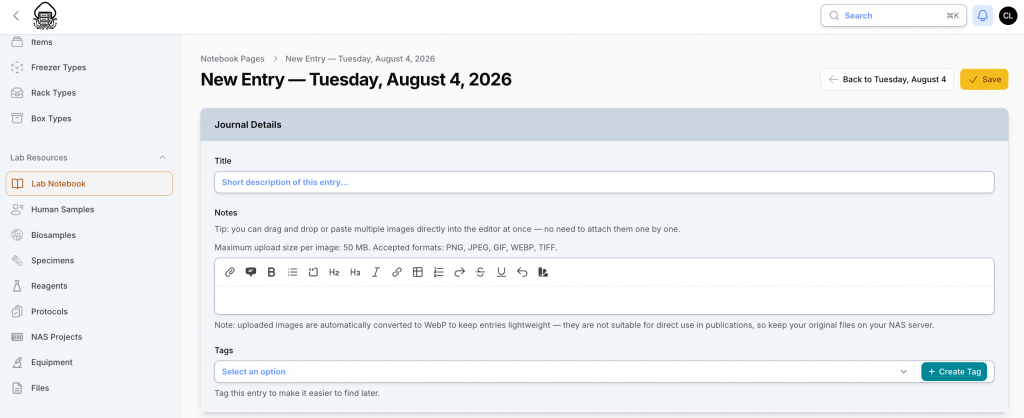
Each notebook entry can include:
- A title and detailed scientific notes.
- Formatted text, lists, tables, and hyperlinks.
- Scientific images, figures, photographs, and screenshots.
- Image captions and experimental observations.
- Documents and other relevant attachments.
- Tags for searching, filtering, and retrieval.
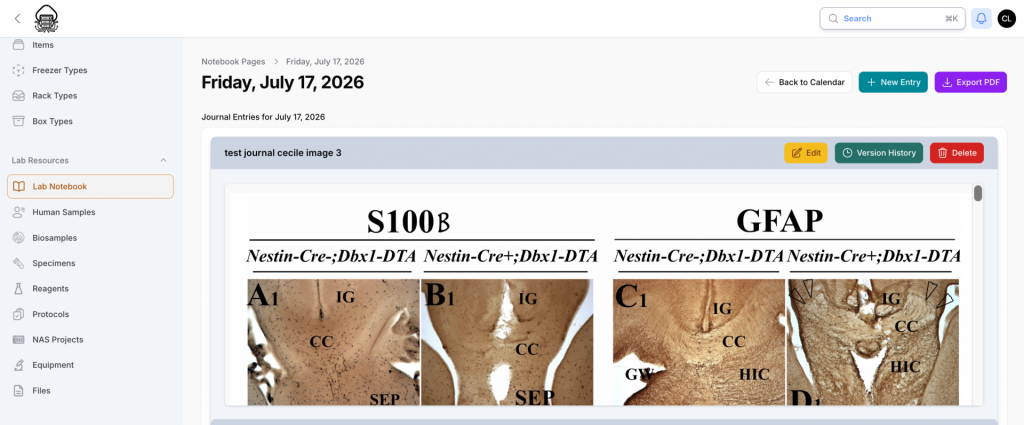
Multiple images can be inserted directly into an entry. Researchers can therefore document microscopy images, histological sections, instrument screenshots, sample tables, intermediate results, and annotated figures alongside their observations and interpretations.
Connection to All DataSquid Resources
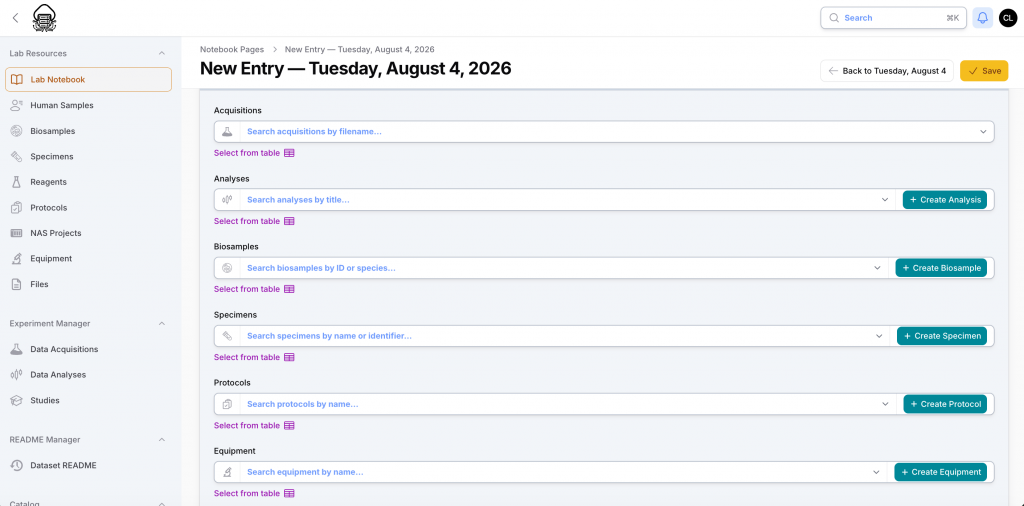
The Lab Notebook is not an isolated note-taking application. It is directly connected to all other DataSquid modules.
Each entry can be linked to:
- Biosamples.
- De-identified human-sample metadata.
- Specimens.
- Protocols.
- Reagents.
- Equipment.
- Data acquisitions.
- Data analyses.
- Data files and folders.
Researchers can select existing resources or create new biosamples, specimens, protocols, equipment records, acquisition or analyses directly while preparing a notebook entry.
For example, a researcher can document an experiment, insert images of the results, and link the entry to the biosample used, the specimens prepared, the protocol followed, the acquisition performed on an FBM technological platform, the acquired files, and the subsequent analysis.
This creates continuous traceability between the daily scientific record and every element involved in the experiment.
Individual Calendars and PI Oversight
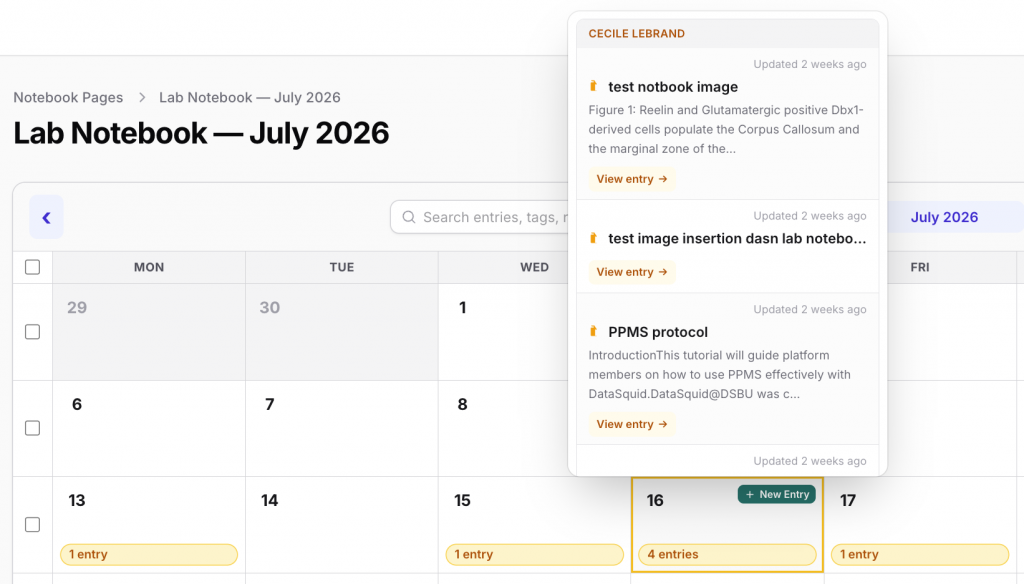
Each laboratory member has an individual Lab Notebook organized as a calendar. Entries can be searched by date, researcher, title, tag, or associated resource.
When enabled by the Principal Investigator , all lab members can browse the notebook calendar of other members in read-only mode.
The Principal Investigator can access the individual notebooks of authorized members of the research group and:
- Consult the calendar of a specific laboratory member.
- Review all entries created on a particular day.
- Follow experimental progress in real time.
- Access the resources linked to each entry.
- Verify that experiments and data are documented consistently.
- Maintain an overview of laboratory activities.
This facilitates scientific supervision, collaboration, knowledge transfer, continuity during staff changes, and long-term preservation of the laboratory’s experimental knowledge.
Real-Time Updates, Version History and PDF Export
Notebook entries can be updated whenever additional information becomes available. Changes are immediately visible to authorized users.
A complete version history preserves successive versions of each entry. Researchers and PIs can track how an entry has evolved and retain access to previous content.
Entries can also be exported as PDF files for:
- Internal review.
- Laboratory meetings.
- Project reporting.
- Archiving.
- Quality-control procedures.
- Sharing a stable version with collaborators.
Biosamples
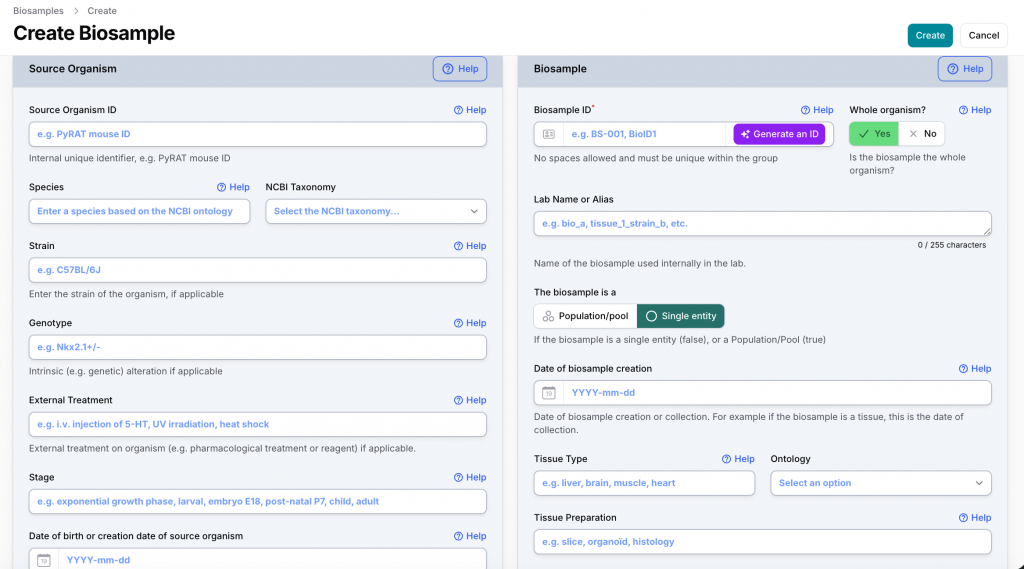
The Biosample module documents biological material obtained from a source organism.
A biosample can represent:
- A whole organism.
- A tissue.
- A biological fluid.
- An organoid.
- Primary cells or cells culture
- Molecules
- Another type of biological material collected or created for research.
DataSquid first documents the source organism and then the associated biosample.
Source-Organism Information
Source-organism metadata can include:
- Internal source-organism identifier.
- Species and NCBI taxonomy.
- Strain.
- Genotype or genetic alteration.
- External treatments or exposures.
- Developmental or biological stage.
- Date of birth or creation.
- Additional descriptive information.
Biosample Information
Biosample metadata can include:
- Unique biosample identifier.
- Laboratory name or alias.
- Whether the biosample represents the whole organism.
- Whether it is a single entity or a population or pool.
- Date of collection or creation.
- Tissue or material type.
- Relevant biological ontology terms.
- Preparation information.
- Additional experimental and biological characteristics.
Biosamples can be created individually or imported in bulk from Excel or CSV tables. DataSquid uses structured fields, NCBI taxonomy, controlled vocabularies, and ontologies to improve metadata quality and interoperability.
Each biosample can be linked to specimens, protocols, acquisitions, analyses, files, datasets, Lab Notebook entries, and its physical storage location in Polaris.
De-identified Human-Sample Metadata
The Human Sample module is specifically designed to document de-identified metadata only.
It does not store directly identifying participant information. Names, addresses, contact details, complete personal identifiers, and other directly identifying information must not be entered into DataSquid.
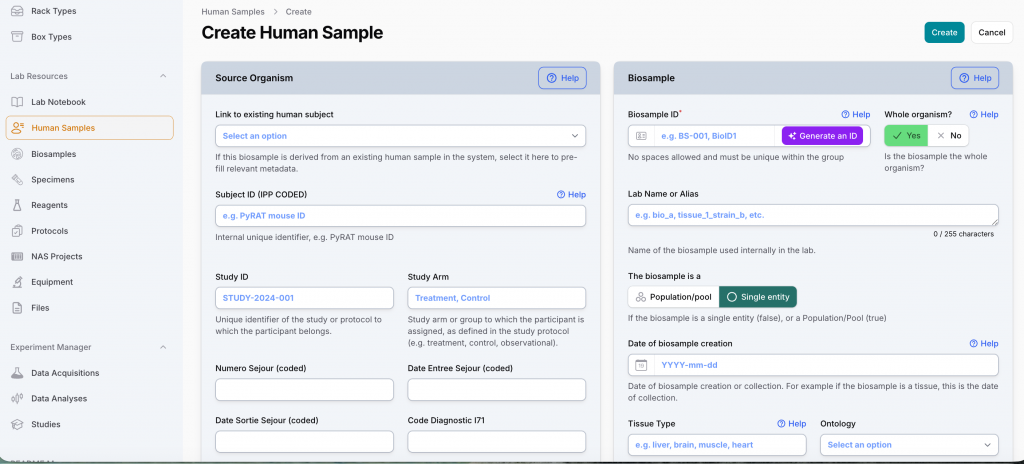
Human-sample records use coded or categorized information, such as:
- Coded subject identifier.
- Study identifier.
- Study arm or participant group.
- Coded clinical or laboratory identifiers.
- Inclusion status.
- Sex at birth.
- Age class rather than exact age, where appropriate.
- Standardized diagnosis codes using ICD-10, SNOMED CT, or Orphanet.
- Disease stage or severity class.
- Intervention or exposure type.
- Intervention timing.
- Study time point.
- Consent status.
- Data-sharing restrictions.
- Relevant coded clinical metadata.
The module documents the scientific context required to understand and reuse a human biosample while minimizing the risk of participant identification.
Import from REDCap
De-identified human-sample metadata can be entered individually or imported from a tabular CSV file exported from REDCap.
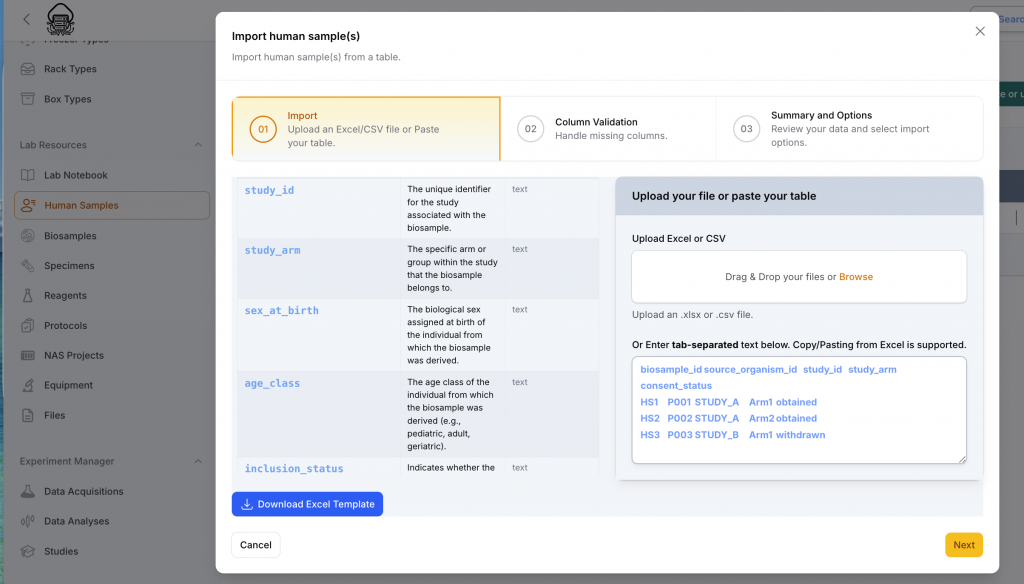
Researchers can upload the REDCap-generated table or paste tab-separated content directly into DataSquid.
During import, DataSquid:
- Validates table columns.
- Identifies missing or incorrectly formatted fields.
- Allows the researcher to review the records before import.
- Uses structured metadata fields to ensure consistency.
Once imported, a human-sample metadata record can be linked to the corresponding Lab Notebook, data acquisition/analyses entries or Dataset Readme standardized documentation for open data via Zenodo or restricted data sharing via the HORUS Dataset Catalog CHUV catalog.
Specimens
The Specimen module documents the physical experimental preparation derived from a biosample and used in a specific procedure or data acquisition.
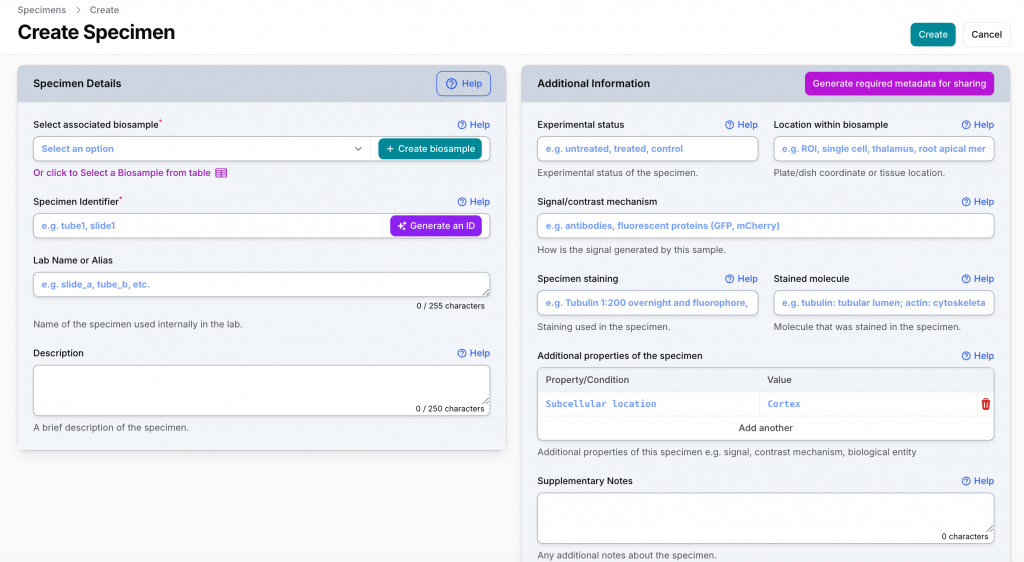
A specimen may be:
- A tissue section.
- A microscopy preparation.
- A tube or aliquot.
- A prepared cell population.
- A stained sample.
- A preparation submitted to an FBM technological platform.
Each specimen remains linked to its source biosample.
Specimen information can include:
- Associated biosample.
- Unique specimen identifier.
- Laboratory name or alias.
- Description of the preparation.
- Experimental status, such as untreated, treated, or control.
- Location within the biosample or plate.
- Signal or contrast mechanism.
- Staining procedure.
- Stained molecule or biological target.
- Additional properties and experimental conditions.
- Supplementary notes.
Specimens can be connected to protocols, reagents, equipment, platform acquisitions, files, analyses, datasets, Lab Notebook entries, and physical storage locations.
DataSquid helps generate the additional specimen metadata required for sharing data through discipline-specific FAIR repositories.
Protocols
DataSquid provides a dedicated module for creating and reusing structured laboratory protocols.
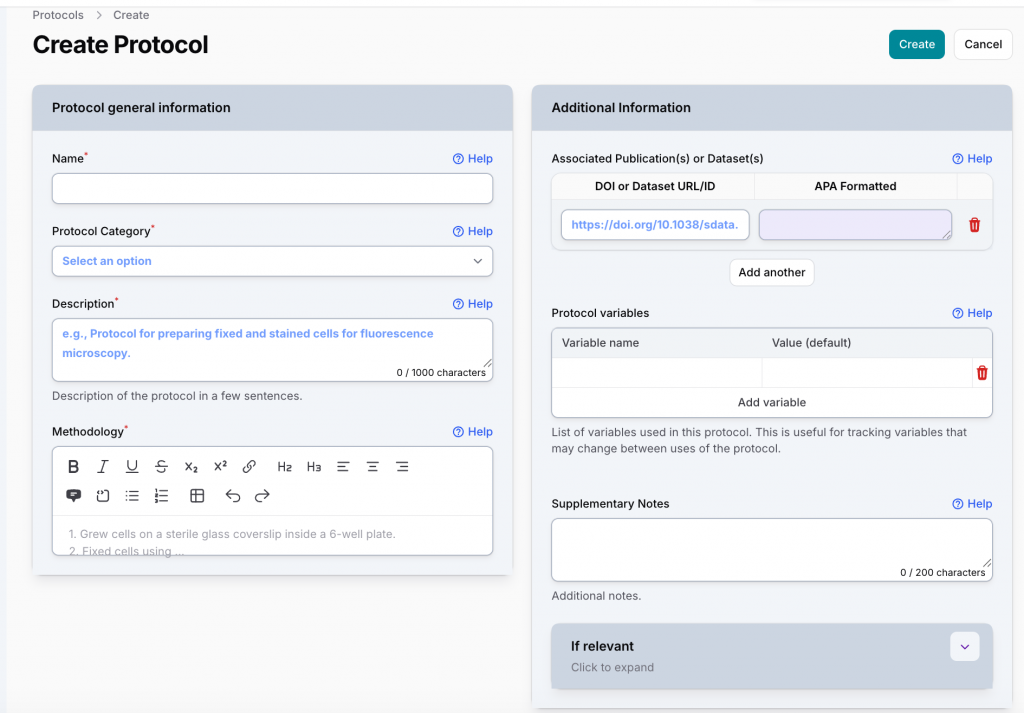
A protocol can include:
- Name and protocol category.
- General description.
- Detailed, formatted methodology.
- Associated publications, datasets, DOIs, or URLs.
- Variables whose values may change between experiments.
- Default values for protocol variables.
- Supplementary notes.
- Discipline-specific information.
Protocols can describe sample collection, sample preparation, specimen preparation, data acquisition, data analysis procedures.
Once entered, a protocol can be reused and linked to biosamples, specimens, acquisitions, analyses, datasets, and Lab Notebook entries.
Automated Integration with FBM Technological Platforms
Data-intensive acquisition workflows across the 12 main FBM technological platforms is automated in DataSquid.
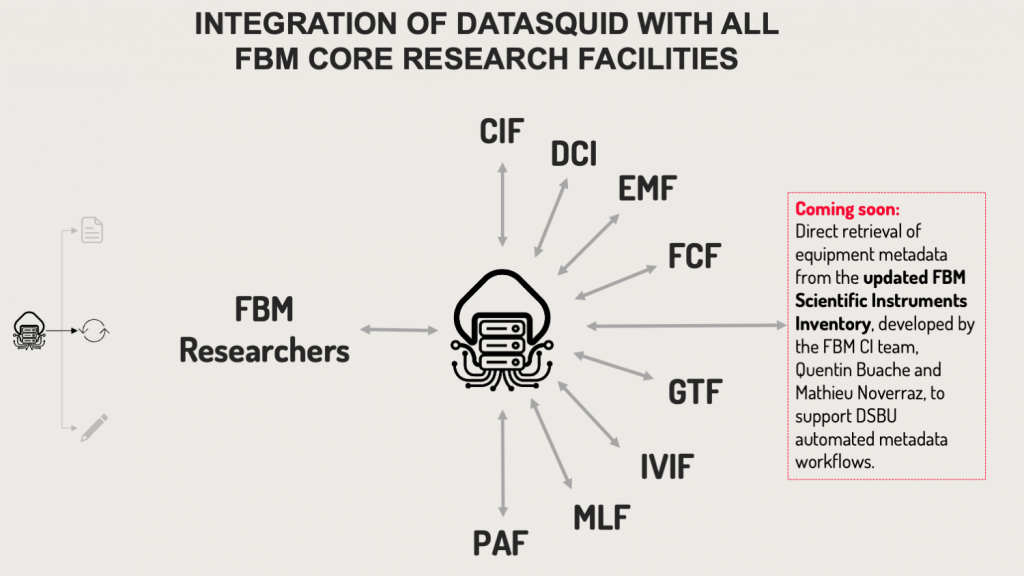
DataSquid connects through APIs to the equipment-booking and laboratory information systems used by these platforms.
Acquisition information can be imported automatically from:
- Laboratory Information Management Systems used by platforms including the Genomic Technologies Facility, Protein Analysis Facility, and Metabolomics Facility.
- PPMS, used by platforms including the Cellular Imaging Facility, Flow Cytometry Facility, In Vivo Imaging Facility, and Electron Microscopy Facility.
Following an equipment reservation or completion of a platform service, DataSquid automatically creates a pre-populated acquisition record.
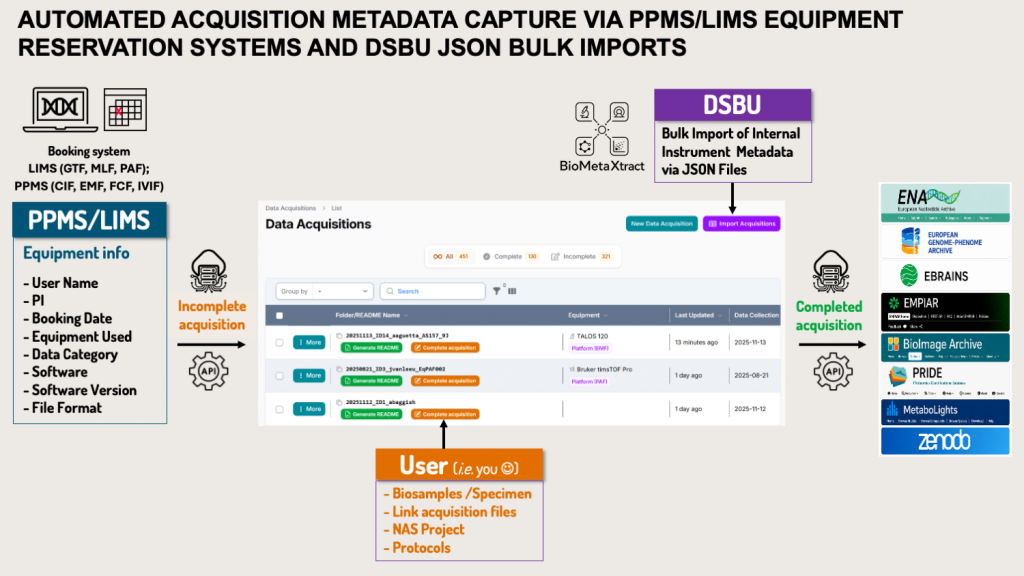
Depending on the platform, imported information can include:
- Researcher and Principal Investigator.
- Technological platform.
- Instrument or equipment.
- Booking or acquisition date.
- Data category.
- Acquisition software and version.
- Export file format.
- Platform-generated sample or specimen information.
- Platform protocols.
- Technical acquisition parameters.
The acquisition record arrives directly in the researcher’s DataSquid workspace. The researcher then completes it with the scientific context of the experiment.
This automation is particularly important for data-intensive research, where technological platforms generate large numbers of acquisitions and substantial volumes of data.
Data Acquisitions and Associated Files
The Data Acquisition module documents how research data were generated and connects acquired files to the samples, specimens, protocols, equipment, and researchers involved.
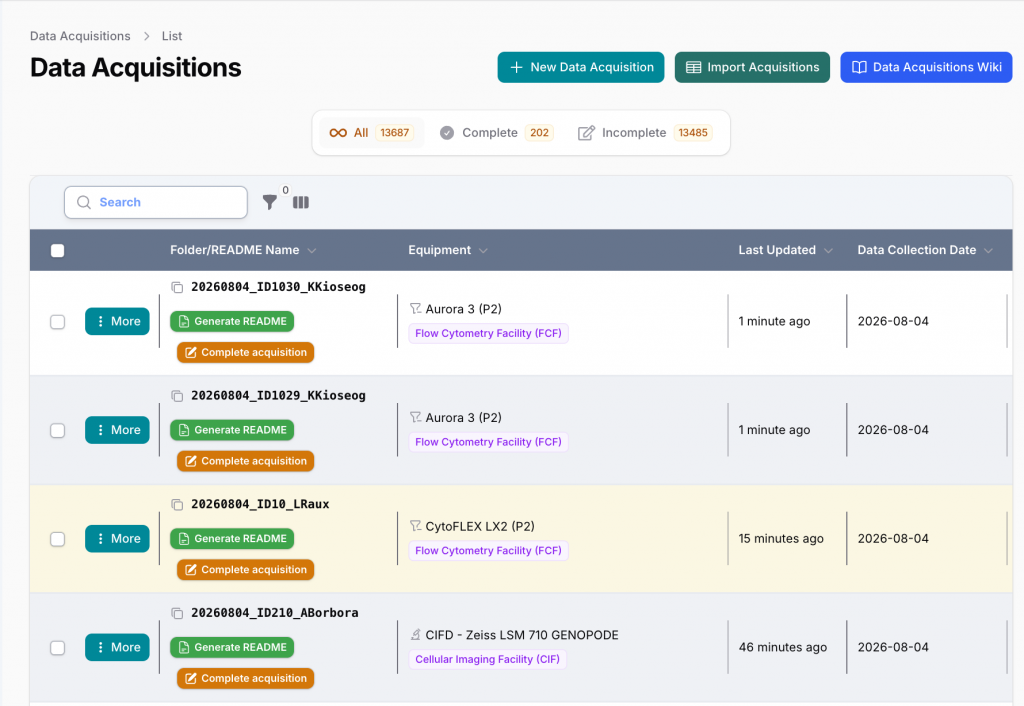
For each acquisition, researchers can associate:
- NAS-DCSR project.
- Biosamples and specimens.
- De-identified human-sample metadata, where applicable.
- Sample-collection and specimen-preparation protocols.
- Acquisition protocol.
- Data category and subcategory.
- Researcher and acquisition date.
- Lab Notebook entries.
File Names, Storage Paths and URLs
Researchers can associate the names and locations of the files generated during an acquisition.
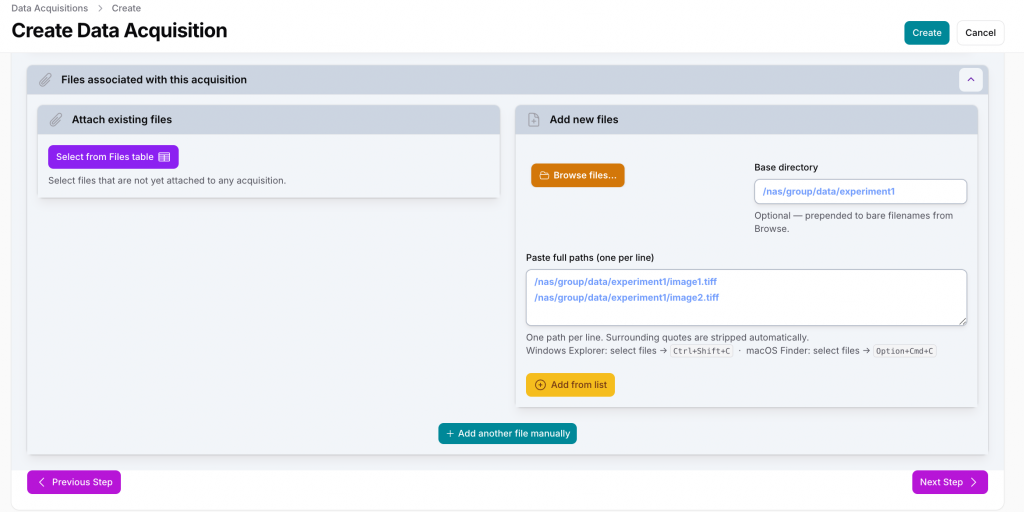
Files can be:
- Selected from the DataSquid Files table.
- Added individually.
- Added in bulk by browsing a local or network directory.
- Registered by pasting a list of full file paths.
- Associated with a common base directory.
- Referenced through a filename, storage path, or URL.
Microscopy images, sequencing files, cytometry files, mass-spectrometry files, analysis inputs, and other acquired data can therefore be connected directly to their acquisition.
The research files remain on the appropriate institutional storage infrastructure. DataSquid documents their names, locations, URLs, formats, and scientific relationships.
The completed acquisition combines:
- Technical information imported from the technological platform.
- Scientific context provided by the researcher.
- Biosample and specimen metadata.
- Protocol and equipment information.
- File names, paths, and URLs.
- Relevant Lab Notebook observations.
An individual README can then be generated to accompany the files in storage.
Data Analyses
The Data Analysis module documents how acquired or externally sourced data were processed and analysed.
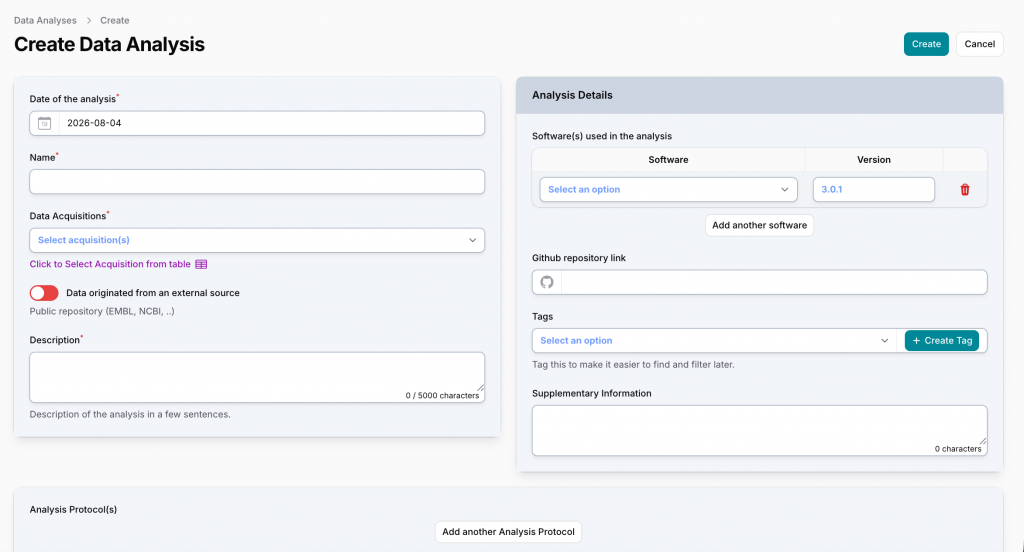
For each analysis, researchers can record:
- Date and name.
- Source acquisition or acquisitions.
- Whether the data originated from an external source.
- Purpose and description.
- Software and software versions.
- Analysis protocols and parameters.
- Links to scripts or GitHub repositories.
- Tags and supplementary information.
- Derived files and results.
Analyses can be linked to their source acquisitions, associated files, and relevant Lab Notebook entries, providing traceability from the original biosample and specimen to the raw data, processing workflow, and analysed results.
Automated NAS-DCSR Project Integration
The DSBU automatically imports NAS-DCSR projects into DataSquid and updates them weekly. No action is required from researchers to create or synchronize their projects.
The Principal Investigator only needs to verify the imported project information and validate new group members when they join a project.
Researchers can then connect their Lab Notebook entries, biosamples, human-sample metadata, specimens, acquisitions, analyses, protocols, folders, and files to the appropriate NAS project.
Polaris: Integrated Sample and Freezer Management
Polaris is a fully integrated DataSquid module dedicated to the physical management of biological materials in life-science laboratories at UNIL and CHUV.
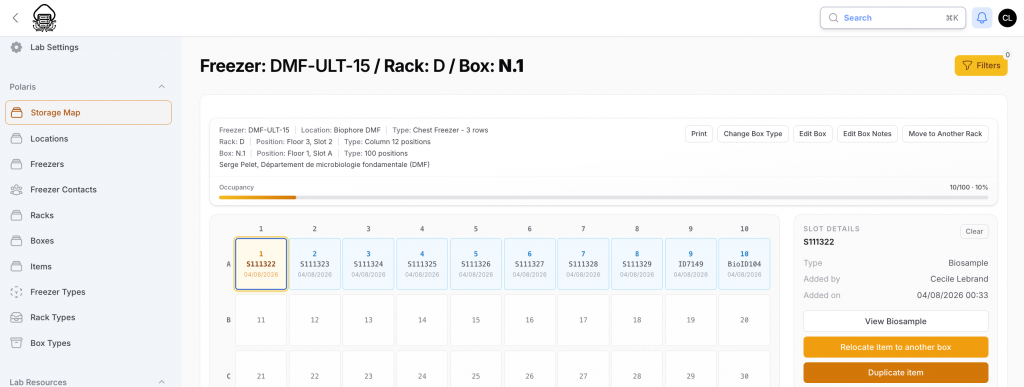
It is not a separate external application. Biosamples, specimens and reagents documented in DataSquid are directly available in Polaris without duplicate entry or transfer between different systems.
Researchers can use Polaris to:
- Manage storage locations, freezers, racks, boxes, and individual positions.
- Assign biosamples and specimens to specific locations.
- Visualize box occupancy and available positions.
- Locate samples rapidly.
- Move items between boxes or storage locations.
- Connect each stored item with its complete scientific description.
- Maintain consistent identifiers across experimental documentation and physical storage.
The same biosample or specimen can be linked simultaneously to its source organism, protocols, acquisitions, analyses, files, Lab Notebook entries, and physical storage location.
This preserves continuous traceability between the biological material, its experimental use, the resulting data, and its physical location.
Integration with BioMetaXtract©DSBU
DataSquid©DSBU is integrated with BioMetaXtract©DSBU, a DSBU tool that extracts technical metadata directly from research data files.
BioMetaXtract can retrieve information embedded in files generated by scientific instruments and analytical software, including:
- Instrument and acquisition-system information.
- Acquisition dates and technical parameters.
- Imaging or measurement settings.
- File formats and technical characteristics.
- Modality-specific metadata.
This technical metadata automatically enriches the corresponding acquisition record.
It is combined with the scientific context already documented in DataSquid, including:
- NAS project.
- Technological platform.
- Equipment.
- Researcher and Principal Investigator.
- Biosamples and specimens.
- Protocols.
- Associated files.
- Lab Notebook entries.
This produces more complete and accurate documentation while reducing manual transcription.
Automated Documentation and Unified Dataset README
DataSquid generates two complementary levels of documentation:
- Individual README files accompanying acquisitions, analyses, and their files in storage.
- A unified Dataset README describing the complete dataset.
Individual README Files
An individual README can be generated for each acquisition or analysis and placed alongside the corresponding files in its NAS storage folder.
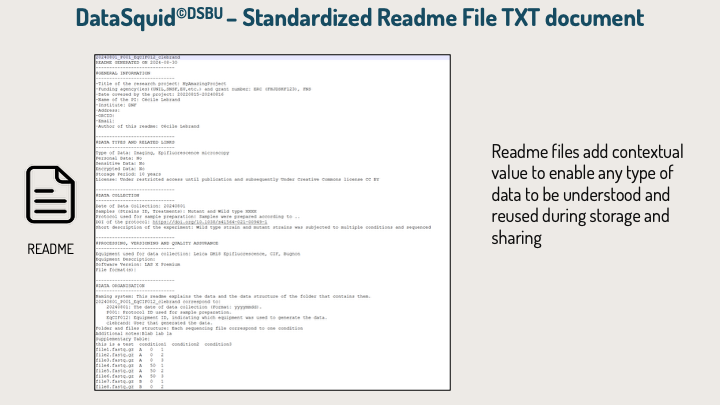
It can describe:
- Acquisition or analysis.
- Associated file names, paths, and URLs.
- Biosamples and specimens.
- De-identified human-sample metadata, where applicable.
- Equipment and acquisition software.
- Analysis software and versions.
- Experimental, acquisition, and analysis protocols.
- Data categories and subcategories.
- Technical and contextual metadata.
These README files help researchers understand the contents of a specific folder and preserve the information required to interpret and reuse its files.
Unified Dataset README
Prospective, proactive, and retrospective dataset-documentation workflows are combined within a single Dataset README module.
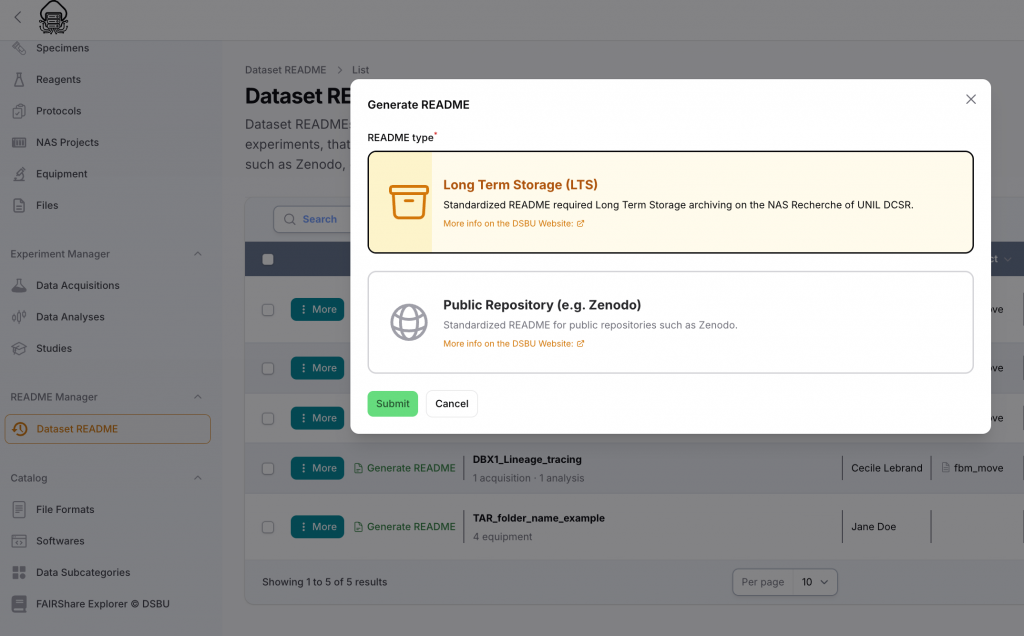
The Dataset README can describe:
- A single experiment.
- A complete data folder.
- Several related experiments.
- A dataset combining multiple acquisitions and analyses.
- A historical dataset documented retrospectively.
- A dataset prepared for Long-Term Storage or public sharing.
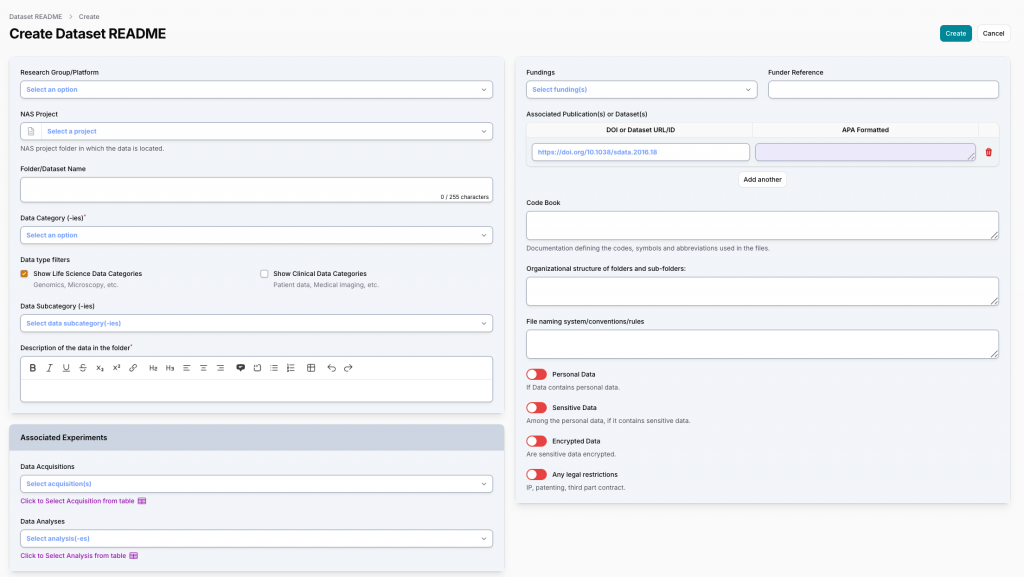
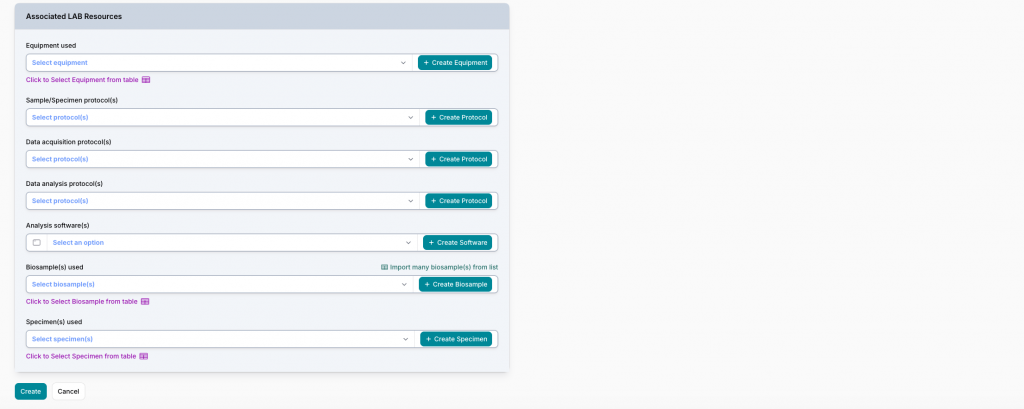
Researchers can combine within the same Dataset README:
- Data acquisitions.
- Data analyses.
- Biosamples.
- De-identified human-sample metadata.
- Specimens.
- Protocols.
- Equipment and software.
- File names, paths, and URLs.
- Data categories and subcategories.
- NAS-DCSR project information.
For ongoing research, the Dataset README is continuously enriched as new samples, specimens, acquisitions, analyses, and files are added.
Historical datasets can be reconstructed by importing existing tables, registering previous acquisitions and files, and adding the contextual information still available.
Documentation Outputs
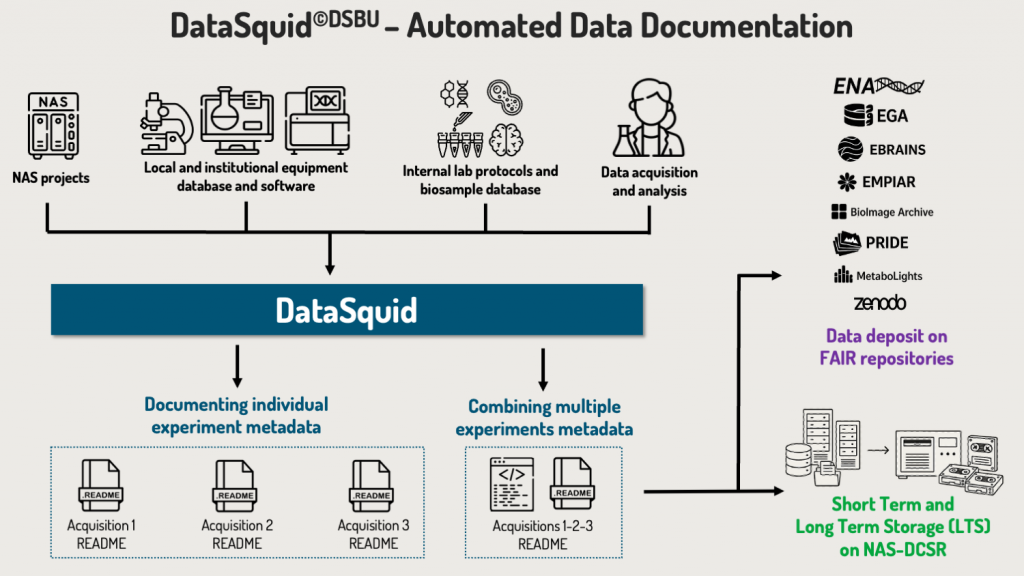
DataSquid can generate:
- Individual README files for acquisitions and analyses.
- Dataset README files combining several related resources.
- Global documentation for TAR packages before Long-Term Storage.
The Dataset README can be generated for:
- Long-Term Storage, following official UNIRIS and DCSR documentation requirements.
- Public repositories, such as Zenodo or for the Horus Dataset Catalog at CHUV.
- Specialized FAIR repositories, using appropriate disciplinary metadata.
- Internal research data management and documentation.
This unified approach simplifies dataset-level documentation while preserving detailed README files alongside individual acquisition and analysis folders.
Automated Transfer to FAIR Data Repositories
DataSquid transmits structured metadata to external FAIR data repositories through automated APIs, including specialized infrastructures such as the European Nucleotide Archive (ENA) for Genomics/transcriptomics Datasets.
Information already documented and validated in DataSquid can be transformed into the structure required by the selected repository and transmitted through its API.
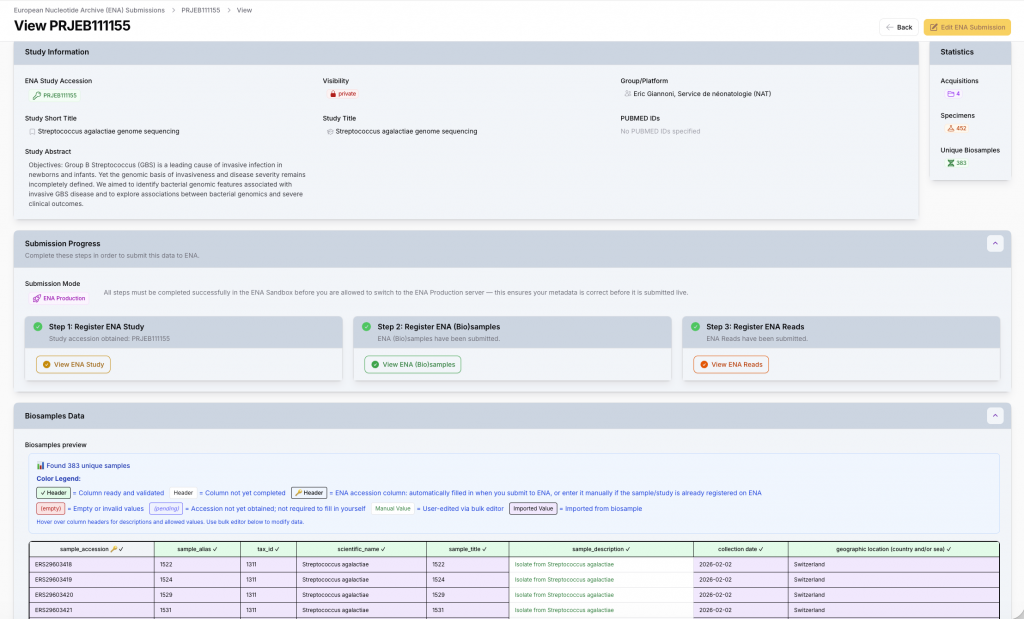
This information can include:
- Project and study information.
- Biosample and specimen metadata.
- Experimental and analytical protocols.
- Acquisition and analysis information.
- Data categories and file formats.
- File names, URLs, and relationships.
- Discipline-specific repository metadata.
This automated workflow:
- Avoids repeated manual entry.
- Reduces transcription errors.
- Ensures consistency between internal documentation and repository records.
- Facilitates compliance with repository requirements.
- Accelerates FAIR data sharing.
- Preserves traceability from the original experiment to the published dataset.
Guidance on Formats, Metadata and Repository Selection
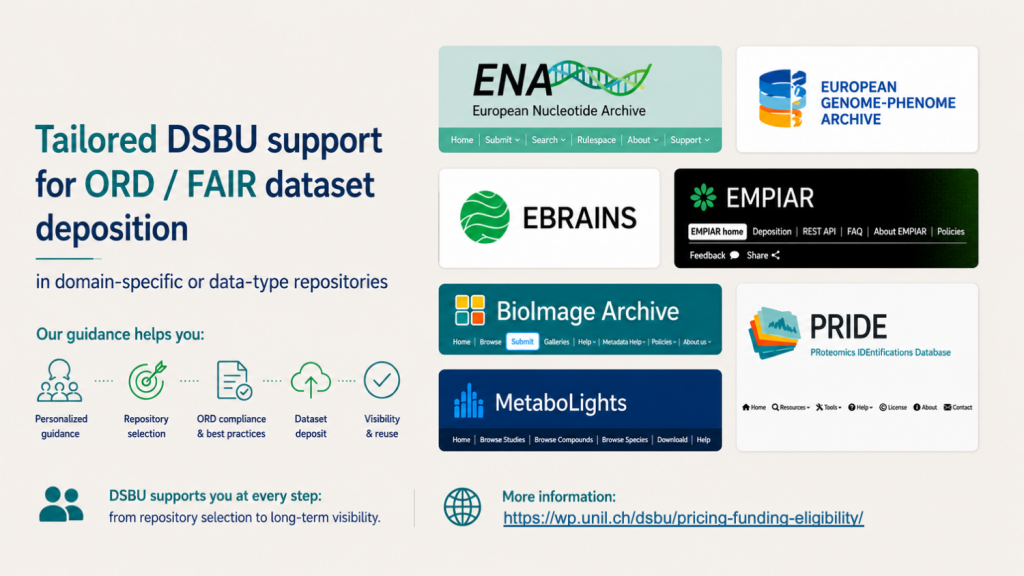
With the help of DataSquid©DSBU and BiometaXtract©DSBU the DSBU provides guidance on
- Recommended and sustainable file formats.
- Disciplinary metadata standards.
- Generalist and domain-specific repositories.
- Documentation required for FAIR and Open Data sharing.
- Data organization and management best practices.
In addition the integrated tools FAIRShare Explorer©DSBU helps researchers identify repositories suited to their data types and sharing requirements.
Preloaded Institutional Resources
The DSBU preloads and maintains essential resources in DataSquid©DSBU, including:
- FBM data categories and subcategories.
- Equipment available on FBM technological platforms.
- Acquisition and analysis software.
- File formats and disciplinary metadata standards.
- Institutional documentation and archiving requirements.
- Recommended FAIR repositories.
These resources reduce manual data entry and improve consistency across laboratories and technological platforms.
Custom Laboratory Resources
Researchers can add resources specific to their laboratory or department, including:
- Laboratory equipment.
- Biosamples.
- De-identified human-sample metadata.
- Specimens.
- Reagents and experimental materials.
- Laboratory protocols.
- Software and analysis workflows.
- Studies and project-specific information.
Resources can be created through guided forms, entered into structured tables, or imported from Excel and CSV files.
Once entered, they can be reused across Lab Notebook entries, acquisitions, analyses, datasets, generated documentation, and Polaris.
Get Started with DataSquid
DataSquid provides a continuous research documentation environment from the original biological material and first laboratory note to data acquisition, analysis, storage, long-term preservation, and FAIR sharing.
Principal Investigators should contact the DSBU before implementation https://dsbu.unil.ch/datasquid-fbm/booking
Our team will:
- Configure the laboratory workspace.
- Adapt DataSquid to the laboratory’s research workflows.
- Prepare relevant equipment, data categories, and resources.
- Define roles and access rights.
- Provide personalized training for laboratory members.
- Support users through ticketing, documentation, and individual consultations.
The DSBU’s configuration, training, and user-support services for using DataSquid for research data documentation are provided free of charge to researchers.