Securing UNIL Data: Key Practices
- Mandatory Storage: Store all UNIL research data on NAS Recherche DCSR or LTS (two copies required); external disk or servers are prohibited. Link: Directive UNIL 4.5 – Traitement et gestion des données de recherche
- Under the responsability of the PI
- Data Organization: structured project directories on NAS-DCSR.
- Storage Rules:
- No personal, sensitive, or admin data on NAS-DCSR and LTS.
- Use NAS-UNIL Admin partition for Administratif personal data.
- Use OneDrive or the NAS-UNIL Admin partition for research-related files like protocols, presentations, references, figures for paper preparation…
Short Term Storage
The DSBU, in collaboration with the Scientific Computing and Research Support Unit (DCSR), assists researchers in selecting the most appropriate storage solution for their research data at every stage of the data lifecycle. We provide guidance and support to ensure that researchers choose the best-suited platform based on the sensitivity of the data (sensitive or non-sensitive), the volume of data, and specific computing requirements. Our goal is to help you manage your data efficiently and securely, aligning with your research needs.
Division calcul et soutien à la recherche (DCSR) – link
Cost: see the price list on UNIL IT center authenticated access. Billing: Costs are charged to research groups- link
Access to DCSR infrastructures (research data storage and computing): Access Form
List of DCSR infrastructures
| Need | Service | Description | Access Link |
| Storage of administrative data | Central NAS server (nas.unil.ch\FBM) | Managed by FBM IT with standardized folder structures for departments. | FBM IT Support |
| Storage of non-personal and non-sensitive research data | DCSR NAS Research- link | Secure server at UNIL for storing and sharing research data with designated collaborators. – Access: VPN required – Speed: High upload/download rates – Reliability: Highly resistant to hardware/software failures – Security: Virus protection, data loss prevention – Backup & Protection: – Incremental snapshot backup – Full daily backup (twice per day, 90-day retention) – Data replication (one copy) every 4 hours on a second NAS in another building💰 Cost: – Only U1 costs are invoiced to the PI – First TB is free – 120 CHF per TB/year (2 copies) Data Management Plan: To open a new project directory on this infrastructure, the PI must make a request accompanied by a DMP (Visit our dedicated webpage for more information on our collaborative DSBU tools and templates to built your DMP). | DCSR NAS Research |
| Storage of unlimited number of object | Amazon S3- link | Scalable object storage service for storing and retrieving unlimited data in “buckets.” It organizes data into containers called “buckets.” Each bucket can store an unlimited number of objects, which are the fundamental entities stored in S3. | Object Storage S3 |
| Storage of sensitive research data (< 2 TB per group) | Tresorit-based service (DCSR) – link | Secure storage service compliant with the Swiss Federal Law on Human Research (LRH). – Security features: End-to-end encryption, access logging, file versioning. – Storage limit: 2 TB per research group. To determine if your data is sensitive (e.g., religious data), check the FAQ . | Tresorit DCSR |
| Computing and storage of sensitive research data (> 2 TB per group) | Urblauna (DCSR) – link | High-capacity computing cluster for large-scale sensitive research projects exceeding 2 TB. Storage resources: – Fast scratch SSD storage: /scratch/beegfs (112 TB, not purged) – Data directory: /data (160 TB for static datasets, including TCGA, ADNI, etc. **Not backed up**) ⚠ data directory is NOT BACKED UP – Archive with encrypted tapes: /archive (600 TB) 🔹 Data is transparently copied onto two tape libraries in two different datacenters for disaster recovery. | Urblauna |
| Computing and transient storage for non-sensitive research data | Curnagl (DCSR) – link | High-performance computing cluster at UNIL: – 96 nodes with AMD Zen2/3 CPUs (4608 cores, 54 TB RAM) – 8 machines with 2x A100 GPUs – Networking: 100Gb/s HDR Infiniband & Ethernet in a fat-tree topology- Storage: – 2 PB disk-backed filesystem – 150 TB SSD-based scratch system – 1.6 TB local NVMe drives per node ⚠ Dedicated storage (work) is for active projects only. **External access**: Only via file transfer protocols (scp). | Curnagl HPC |
| Real-time collaborative editing of non-sensitive derived research data | OneDrive (Microsoft 365) – link | Used for real-time document collaboration. – Research raw data only passes through this service for the duration of the collaborative edition (e.g. while wrtting a paper). – Raw data **must** be moved to the DCSR NAS after editing. – Can store **research-related** files (protocols, presentations, references, etc.). | OneDrive |
| Transfer of non-sensitive research data | Filetransfer- link | – Send or receive large files via email notification. – Max size: 4 TB – No installation required (web-based) -Expiration date configurable – Guest invitations supported | Filetransfer |
| Transfer of sensitive research data | SWITCHfile sender- link | Secure file transfer service. – **Must use password encryption for sensitive data.** – Max size*: 300 GB – No installation required (web-based) – Expiration date configurable – Guest invitations supported | SWITCHfile sender |
Long Term Storage / Archiving
Through the process of data life cycle management, our team is providing information, advice and help to FBM UNIL researchers for long term storage and preservation of their data for free at the DCSR UNIL.
Contact us for guidance on how to prepare your Readme file and reorganize your data in order to preserve your work.
DSBU will help you by:
- Informing and guiding you through the process of reorganizing and describing your research data in the form of explanatory documents called “readme file”.
- Offering you two powerful tools, DeepScan@DSBU to screen your data folders on the NAS-DCSR and DataSquid@DSBU to generate semi-automatically the documentation as a readme file.
- Final validation of your readme file and data re-organization before data migration from the DCRS NAS to the LTS platform.
LTS Caracteristics
- Under the responsability of the PI
- Free of charge (2 copies with security and backup)
- Time limit for storage duration (e.g. for published data at minimum 10 years after the date of the article acceptance) with possible extension (1x).
- Restricted access (limited number of accesses to data on LTS and under request only).
- Effective organization of your data under a project form (matched with a funding, a specific theme, a publication etc.).
- Production of a Readme file (document describing the dataset content) for each individual futur TAR subdirectory
- Naming rules for (TAR = Tape Archive) subdirectories in the LTS directory
Securing UNIL Data: Key Practices
- Mandatory Storage: Store all UNIL research data on NAS Recherche DCSR or LTS (two copies required); external disk or servers are prohibited. Link: Directive UNIL 4.5 – Traitement et gestion des données de recherche )
- Storage Rules:
- No personal, sensitive, or admin data on NAS-DCSR and LTS.
- Use NAS-UNIL Admin partition for Administratif personal data.
- Use OneDrive or the NAS-UNIL Admin partition for research-related files like protocols, presentations, references, figures for paper preparation…
Procedure
Step1 – Data organization
- You need to reorganize your data according to the projects you will have defined and clean up/eliminate obsolete data.
- Research data must be organized into the LTS directory around a given project (matched with a funding, a specific theme, a publication etc.).
Step 2 – Transfer your data to the LTS subfolder of the NAS project
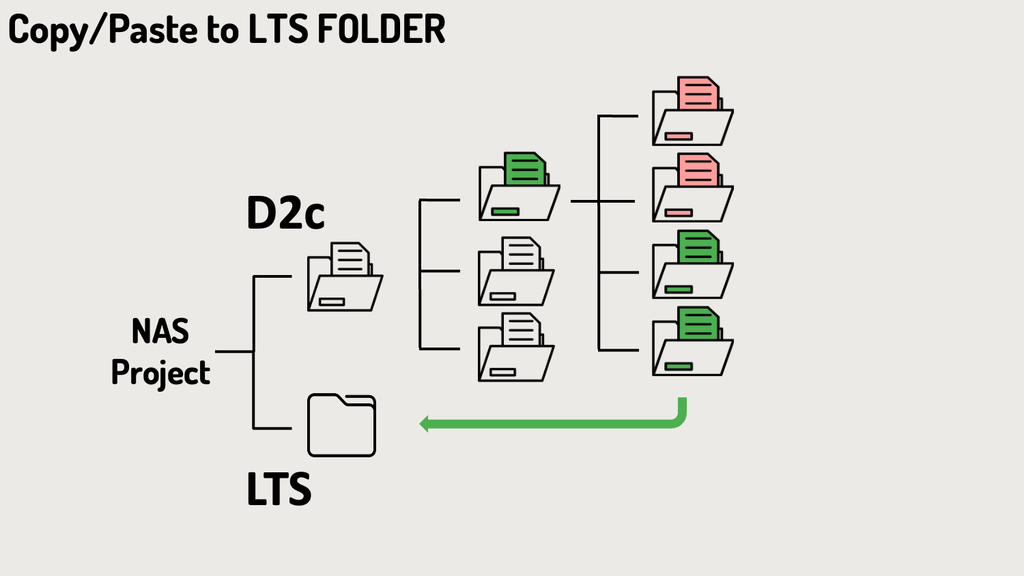
Two possibilities:
- For small data: use the copy/paste function or linux command line to copy your data from D2c to LTS.
- For big data, please contact us at dsbu@unil.ch and provide the requested information on the tab bellow. The bulk transfer will be organized through the DCSR service, as this may be required to ensure timely completion of the process.

Step 3 – TAR (Tape Archive) subdirectory to be archived
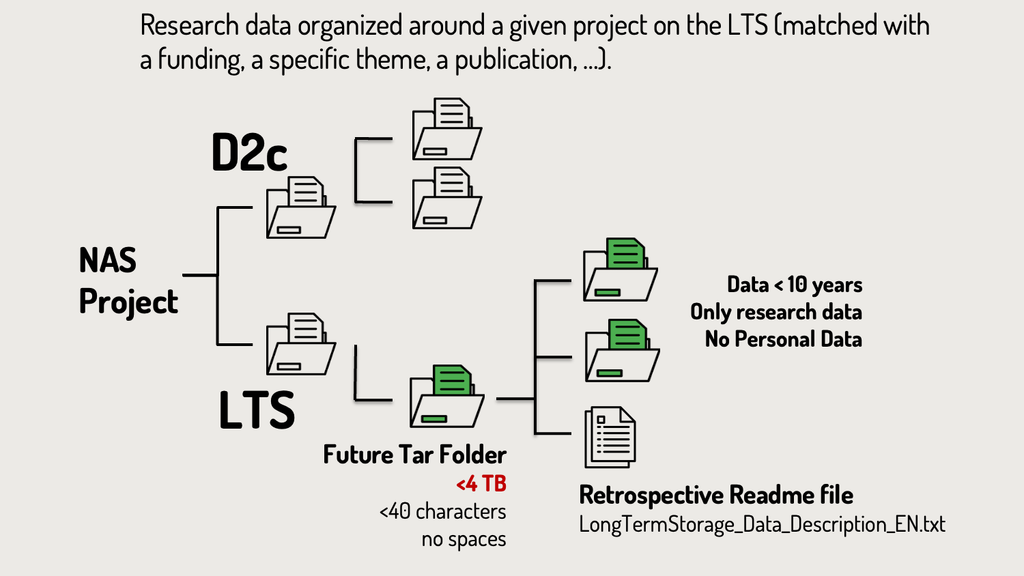
- TAR archive file: size of the data volume in each individual subdirectory to be archived is free up to 4 TB per subdirectory in the LTS directory. Do not compress your data since this step will be done during the creation of the TAR subdirectory.
- The TAR files to be archived must remain at the root of the LTS directory.
- Each TAR subdirectory has to comply to naming rules (see below) and should be accompanied by an independent readme file. We require you to use our new DSBU tool DataSquid@DSBU to create a LTS Readme file that can be shortly adapted to each individual TAR subdirectory – link.
- The naming rule only applies to the first TAR sub-folders in the LTS directory. The TAR archive files created from these directories will have the same name. Within these directories the names of the files and data directories are free.
- Naming rules for subdirectories in the LTS directory (TAR archive file). The length of the folder name must not exceed a maximum of 40 characters according to the rules below
- Numbers from 0-9
- Letters a-z
- Letters A-Z
- Hyphen ( – ) OK but not at the beginning or end of the directory name
- Underline ( _ ) OK but not at the beginning or end of the directory name
- No white spaces
- No accented characters or symbols
Step 4 – Data description (Readme file)
Complete the readme file for each distinct subdirectory to be archived in individual TAR archive file following the established guidelines.
The name and file format of the readme file for LTS must not be changed, “LongTermStorage_Data_Description_EN.txt”.
FBM Template: DSBU automated readme file
Our unit is deploying a user-friendly and automated methodology for generating readme files for FBM Datasets.
DataSquid@DSBU is an advanced tool that automates data documentation for experiments by integrating with equipment databases and laboratory protocols, ensuring comprehensive, consistent, and reproducible research documentation. link
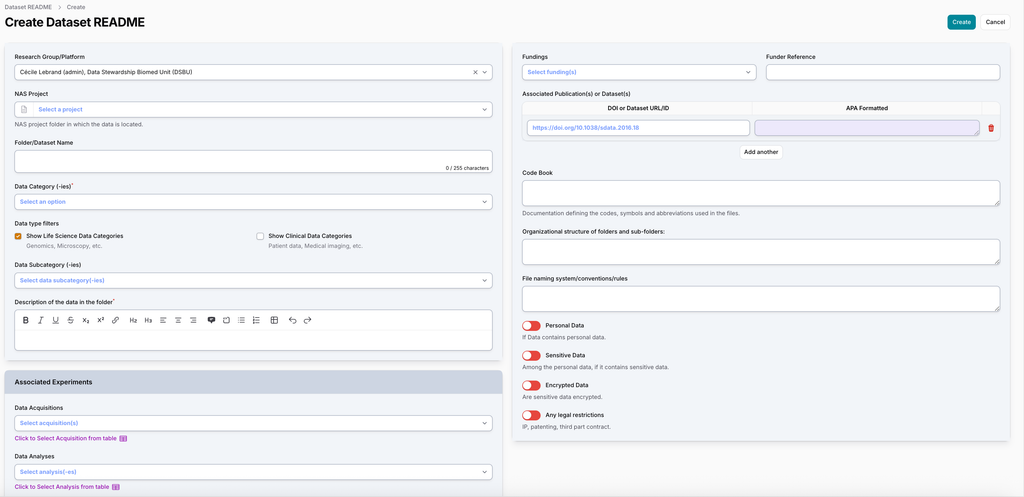
Once your readme file have been approved by clebrand, they should be included at the root of each individual moved within data subdirectory and the future TAR file should be moved from the D2C directory to the LTS directory.
For any assistance feel free to contact us via our contact form, email or visit our offices: https://wp.unil.ch/dsbu/contact/
Step 5 – Procedure to request the transfer of “cold” Data to Long-term storage (tape)
Request LTS tape transfer via the NAS DCSR dashbord
- Via the interface on the homepage, you will be able to request the LTS tape transfer for part of your data by clicking on the button “Request for long-term storage (LTS)” in the list of actions listed on the interface homepage. Connect and sign in to your NAS DCSR dashboard via your SWITCH UNIL account using this link .
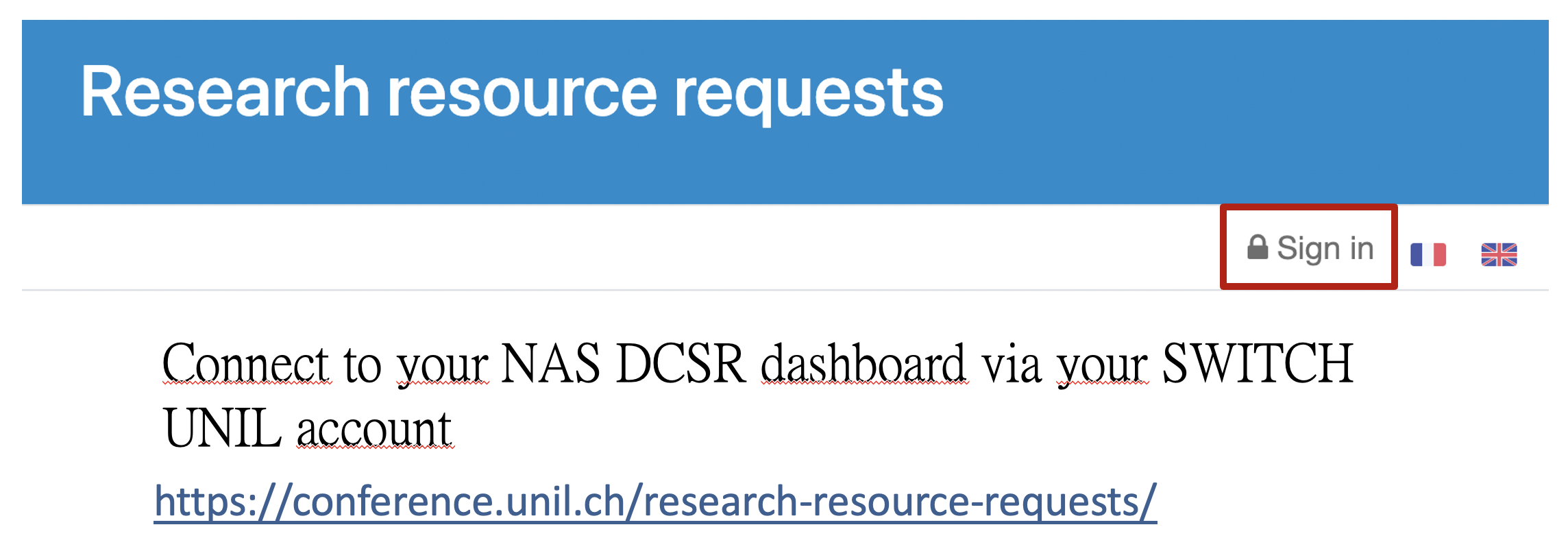
- Select «making a long term storage request» via your DCRS dashboard interface to ask for Long Term Storage (LTS).
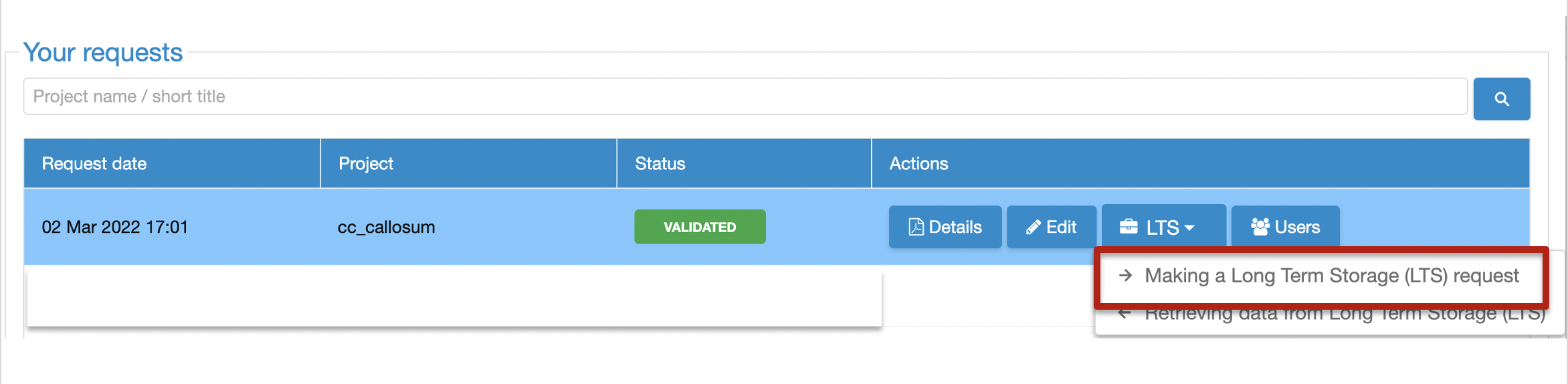
- To send your request for long term storage of part of your research data on magnetic tape, click on the submit button. Mention which data you would like to transfer for long term storage.
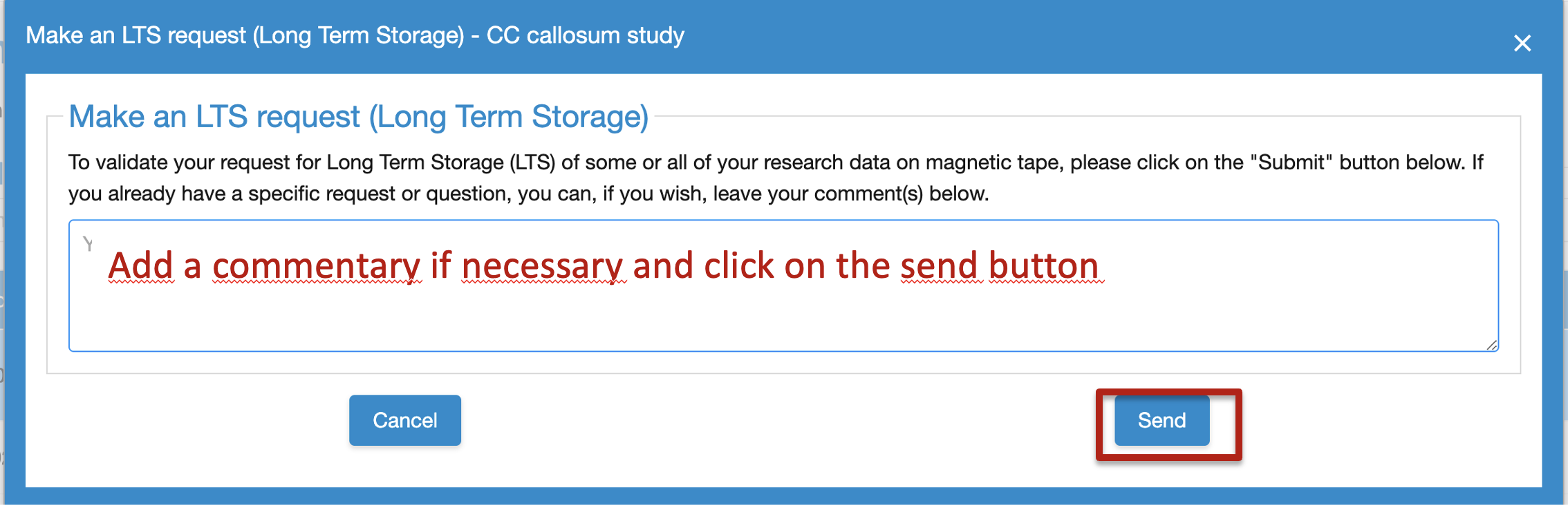
- An e-mail will be send automatically to the DSBU.
- The DCSR will perform last automatic technical controls.
Step 6 – Validation
The DCSR will create the TAR archive files and transfer your data on magnetic tape with all individual readme file included at the root of each individual TAR archive file. After completing the magnetic tape transfer process for the TAR directory, the LTS directory will include the following elements:
- The TAR file will be renamed by adding the prefix “ARCHIVED*,” and the underlying information will only be accessible in read-only mode.
- A copy of the readme file “LongTermStorage_Data_Description_EN.docx” will be accessible in read-only mode.
- A file named “INVENTORY_OF_ARCHIVED_FILES.txt” within the TAR directory will list the archived files with their full paths and provide information on the recovery procedure from the tapes.
This procedure ensures that the archived data remains accessible and easily identifiable. The addition of the “ARCHIVED*” prefix allows researcher to quickly confirm that archiving has been completed by simply examining the TAR directory names at a given moment.
Step 7 – Data recovery of TAR subdirectory from magnetic tape (LTS)
Retrieval Cost Model still under discussion
- Limited Free Retrieval Allowance: Researchers can retrieve a limited number of 5 TB of data within a 12-month period without incurring costs.
- Additional Retrieval Cost: Retrievals exceeding the limit in the 12-month window will be charged 50 CHF per additional TB.
- In addition to the fees associated with retrieving data from LTS tape storage, please note that the standard DCSR NAS storage costs will apply again once the data have been restored to the NAS, at approximately CHF 110 per TB per year.
Request TAR retrieval for the tape using the invoicing application available at the link below.
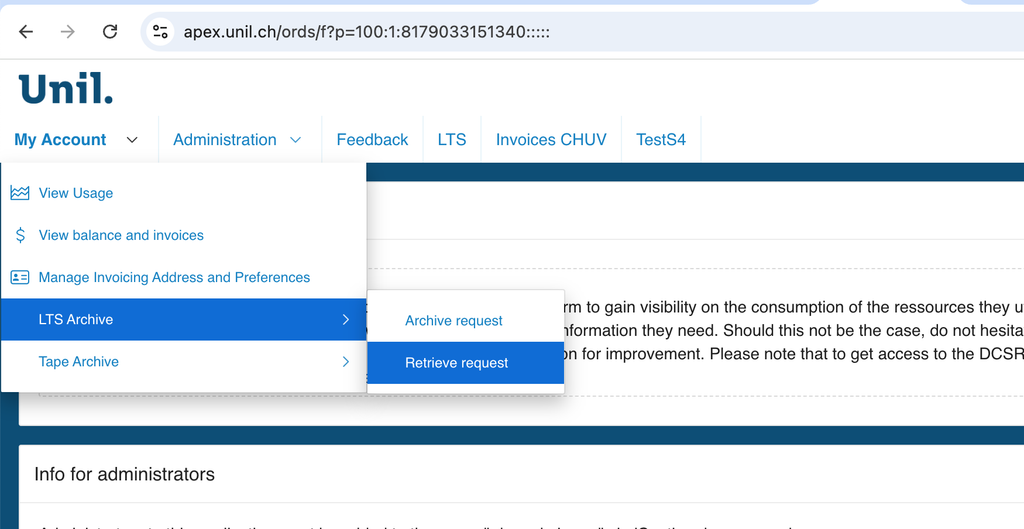
- From the My Account menu, select LTS Archive and Retrieve Request.
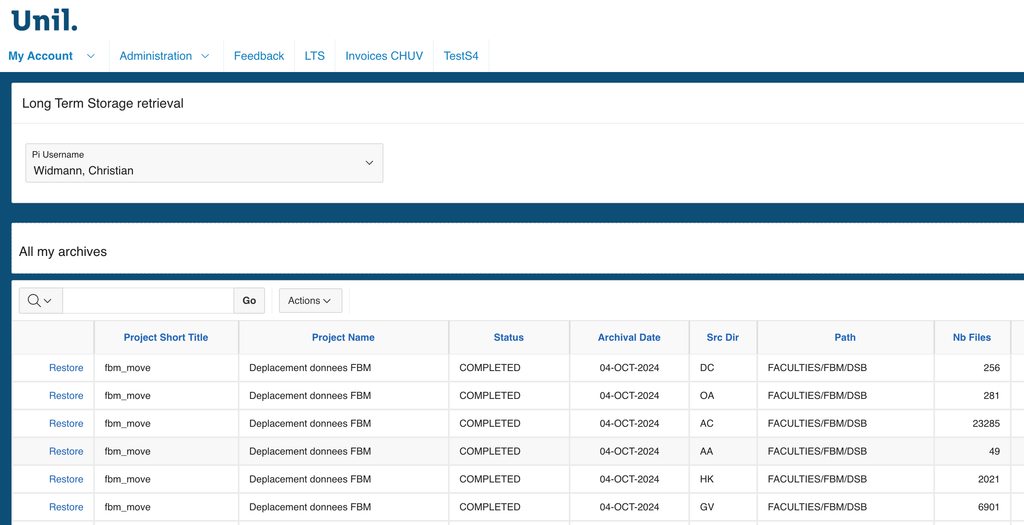
- Once on this page, select the folders you wish to retrieve and click Restore to have them restored to their original location on your NAS partition.
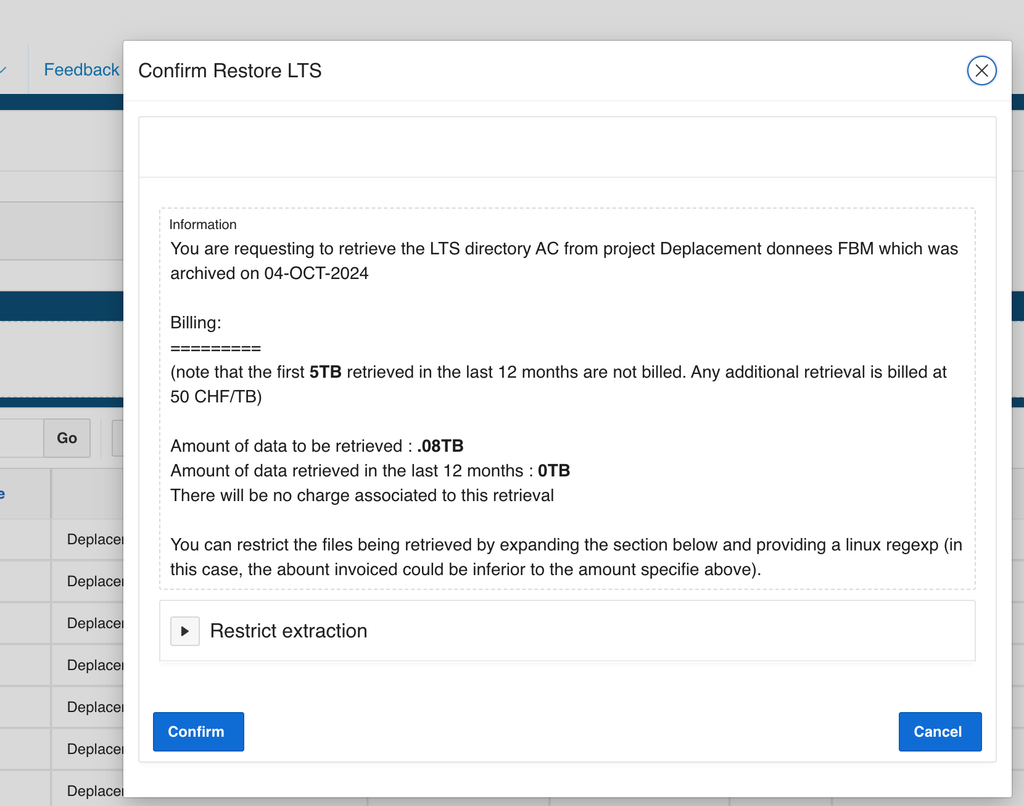
A page will then display the applicable data retrieval fees. Please note that up to 5 TB of data archived to tape within the previous 12 months can be retrieved free of charge. Any additional data retrieval will be charged at CHF 50 per TB. See the example below.
Once the data retrieval process has been completed, you will receive an email confirming that your folders have been successfully restored and providing the necessary information regarding their location and how to access them.
If you have any questions, feel free to reach out using our generic e-mail Email: dsbu@unil.ch
Standard Procedure for the Departure of a PI/Research Group from UNIL
When a Principal Investigator (PI) or his/her group leaves UNIL (in the event of a change of institution, retirement or death), his/her research data must be archived on UNIL’s dedicated infrastructures for Long term Storage (LTS), in accordance with the procedures in force.
Detailed procedure (English version)
1. Copy of data – Change of institution
If the PI moves to another institution, he/she may request a copy of his/her research data. A formal request (see the document “Protocole applicable aux Principal Investigator quittant l’Université de Lausanne et souhaitant emporter une copie des données de recherche de leur groupe de recherche”) must be addressed to the Research Dean’s Office.
The request must include the following elements:
- Summary of the research carried out by the group.
- Nature of the data: research, personal or sensitive data.
- Authorisation from the Cantonal Ethics Commission (if applicable).
- Information on the host institution: name, location and characteristics.
- Brief presentation of the future research planned by the PI.
Validation procedure
1.1. Research Dean’s Office :
- Evaluates the application and issues an opinion.
1.2. If approved :
- A transfer contract (contrat de cession) is drawn up by the PACCT.
- The contract is validated and signed by all parties concerned:
- A representative of the host institution.
- The Vice-Dean of Research and Innovation FBM.
- The Vice-Rector Research and International Relations UNIL.
2. Data archiving on magnetic tapes- Change of institution or retirement
At least six months before leaving, the PI must prepare his/her data for archiving in accordance with the following steps:
2.1. Contact the Data Stewardship FBM team (DSBU)
The DSBU will assist the PI in the following stages:
- Reorganisation and documentation of the data.
- Semi-automated preparation of README files describing the data.
- Final validation of the file before migration of the data from short-term storage sites (NAS DCSR) to long-term storage (LTS) at no cost to the PI.
2.2. Data curation by the PI
- The PI sorts, organises and deletes obsolete data.
- Data must be structured by project, theme or publication.
2.3. Documentation and Long Term Storage transfer of data by the PI with the support of the DSBU
- Data documented by the PI is transferred to long-term storage (LTS) to ensure preservation for the next ten years.
- The documentation includes a README file conforming to the standard UNIL README Long-Term Storage File Description.
2.4. Validation by the DSBU
- Once the data is ready, the DSBU carries out a final quality check before validating the transfer to the LTS.
- After validation and confirmation of archiving by the DSBU, the PI can ask the DCSR to revoke its access to storage infrastructure projects.
3. Roles and Responsibilities
- PI (Group Leader): prepares, organizes, and documents their data before departure. They must delete obsolete data.
- Dean’s Office – Research (Vice-Dean for Research): evaluates requests for data transfer to another institution and makes a decision.
- FBM Legal Advisor (Juriste FBM): drafts and obtains validation for the transfer agreement (contrat de cession).
- PACCT: validates and signs the transfer agreement.
- FBM Data Steward (Head of DSBU), in accordance with UNIRIS:
- Assists in organizing and documenting data through a README file.
- Gives final approval for Long Term Storage via the DCSR application.
- DCSR (DCSR Manager):
- Carries out the final archiving of data on magnetic tapes.
- Revokes access to the data on the NAS-DCSR server.
Procédure (Version Française)
1. Copie des données – Changement d’institution
Si le PI rejoint une autre institution, il peut demander une copie de ses données de recherche. Sa demande formelle (voir le document “Protocole applicable aux Principal Investigator quittant l’Université de Lausanne et souhaitant emporter une copie des données de recherche de leur groupe de recherche”) doit être adressée au Décanat Recherche.
La demande doit inclure les éléments suivants :
- Résumé de la recherche menée par le groupe.
- Nature des données : recherche, données personnelles ou sensibles.
- Autorisation de la Commission cantonale d’éthique (si applicable).
- Informations sur l’institution d’accueil : nom, localisation et caractéristiques.
- Présentation succincte de la recherche future prévue par le PI.
Procédure de validation
1.1. Décanat Recherche :
- Évalue la demande et émet un préavis.
1.2. En cas d’accord favorable :
- Un contrat de cession est rédigé par le PACCT.
- Le contrat est validé et signé par toutes les parties concernées :
- Un représentant de l’institution d’accueil.
- Le Vice-Doyen Recherche et Innovation FBM.
- Le Vice-Recteur Recherche et Relations internationales UNIL.
2. Archivage des données sur bandes magnétique– Changement d’institution ou retraite
Six mois au minimum avant son départ, le PI doit préparer ses données pour le stockage à long terme selon les étapes suivantes :
- Contact avec l’équipe Data Stewardship de la FBM (DSBU)
- La DSBU assiste le PI dans les étapes suivantes :
- Réorganisation et documentation des données.
- Préparation semi-automatisée de fichiers README décrivant les données.
- Validation finale du dossier avant migration des données des sites de stockage à court terme (NAS DCSR) vers le stockage à long terme (LTS) sans aucun frais pour le PI.
- La DSBU assiste le PI dans les étapes suivantes :
- Curation des données par le PI
- Le PI trie, organise et supprime les données obsolètes.
- Les données doivent être structurées par projets, thématiques ou publications.
- Documentation et transfert des données par le PI pour le Stockage à Long Terme (LTS) avec le soutien de la DSBU
- Les données documentées par le PI sont transférées vers le stockage à long terme (LTS) pour en assurer la préservation pour les dix prochaines années.
- La documentation inclut un fichier README conforme au modèle standard UNIL “README Long-Term Storage File Description”.
- Validation par la DSBU
- Une fois les données prêtes, la DSBU effectue un contrôle qualité avant de valider le transfert vers le LTS.
- Après validation et confirmation de l’archivage par la DSBU, le PI peut demander à la DCSR de révoquer ses accès aux projets sur les infrastructures de stockage.
3. Rôles et responsabilités
- PI (Chef de groupe) :
- Prépare, organise et documente ses données avant son départ. Il doit éliminer les données obsolètes.
- Décanat Recherche (Vice-Doyen Recherche) :
- Évalue les demandes de copie de données en vue d’un transfert vers une autre institution et émet une décision.
- Juriste FBM (Administration FBM) : rédige et fait valider le contrat de cession
- PACCT : valide et signe le contrat de cession.
- Data Steward FBM (responsable de la DSBU, en lien avec UNIRIS) :
- Aide à l’organisation et à la documentation des données via un fichier README.
- Donne le feu vert pour l’archivage final des données via l’application de la DCSR.
- DCSR (Responsable DCSR)
- Procède à l’archivage définitif des données sur bandes magnétiques.
- Révoque les accès aux données sur le serveur NAS_DCSR.
Documents and useful links
- Directive de la Direction 4.2 sur l’intégrité scientifique dans le domaine de la recherche et sur la procédure à suivre en cas de manquement à l’intégrité
- Protocole applicable aux Principal Investigator quittant l’Université de Lausanne et souhaitant emporter une copie des données de recherche de leur groupe de recherche
- Long Term Storage procedure and DSBU support
- Directive de la Direction 4.5 sur le traitement et la gestion des données de recherche